
Participant
May 18, 2016
Answered

Creating PDF from the Adobe Plugin in MS Outlook 365 no images convert.

  • May 18, 2016
  • 1 reply
  • 1734 views

Case 0187809571. Creating PDF from the Adobe Plugin in MS Outlook 365 works, but the images do not convert. Adobe DC was purchased and installed on 6 May and MS Office 365 was purchased and installed on 6 May. So both programs are the latest versions.
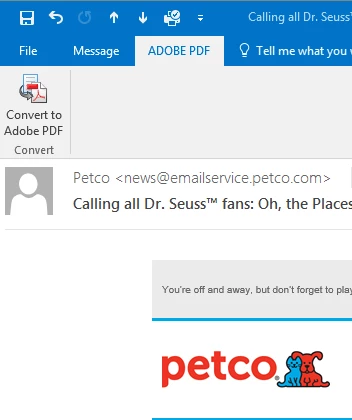
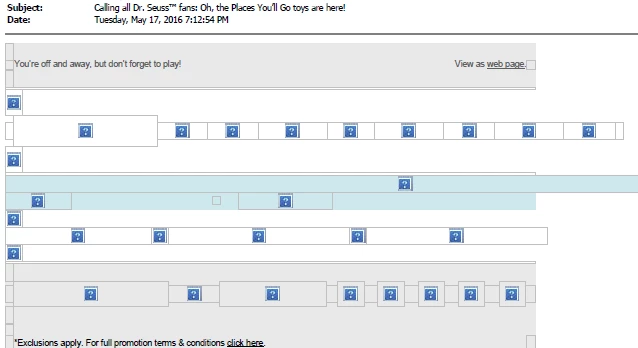
Creating a PDF of an email this way (above) results in:
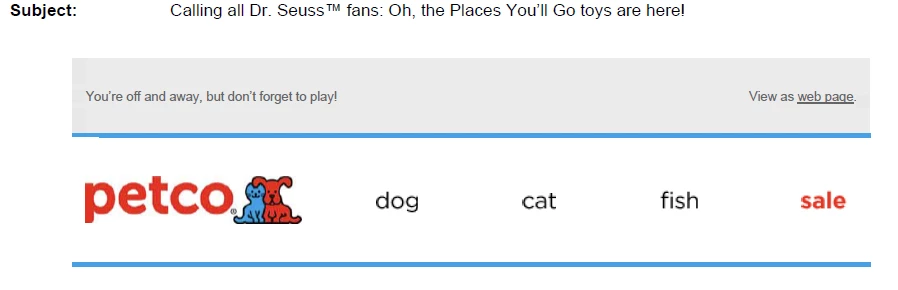
I've tried 2 Chat sessions without resolution. If I "print" to PDF, it is ok:
Please help. This happens to ALL emails with images.

This topic has been closed for replies.
Correct answer Tariq Ahmad

Hi bethm19302338,

launch Outlook, click on Adobe PDF tab, click on conversion settings.

Once you see the conversion settings window, check if this option is checked "Block Download of external contents". Try to uncheck and restarting outlook and then try converting again.

Regards,

Tariq Dar.

1 reply

Meenakshi Negi
Community Manager
Community Manager
May 18, 2016

Hi bethm19302338

Make sure that the application updated to the latest patch released Release Notes | Adobe Acrobat, Reader

You can "Check for updates" under Help menu.

If you still experience the issue, please share the dot version of Acrobat DC and OS you are using.

Also share the exact steps you do to convert it to PDF.

Regards,

Meenakshi

Participant
May 18, 2016

Meenakshi,

Thank you. I checked "again" for updates to Acrobat DC by:

Help > Check for Updates

The response was "No Update Available"

Adobe Acrobat DC 15.006.30172

The problem still exists

OS = Windows 7 Ultimate 64 Bit Version 6.1 (Build 7601: Service Pack 1)

MS Outlook 2016 MSO Version 16.0.6828.1015 32-Bit

Steps as follows:

Open MS Outlook

Open any email with images in it

In the Ribbon at the top of the email, the choices of tabs are "File" "Message" and "ADOBE PDF".

Click on "ADOBE PDF" tab.

Only 1 choice in that tab, "Convert to Adobe PDF"

Click on "Convert to Adobe PDF"

A window opens to "Save Adobe PDF File As"

I select the folder and enter a name for the email and then click "Save"

A window pops up "Creating Adobe PDF"

Once the PDF is created, the resulting PDF file opens on the screen.

Anywhere an image was in the email, the PDF of the email now has the little blue squares with "?" inside (as example shown above in first message).

Alternately #1,

if I "Print" the email, the images are visible.

In the Ribbon at the top of the email, the choices of tabs are "File" "Message" and "ADOBE PDF".

Click on "File" tab.

Click on "Print"

A window opens to select printer, etc.

Under "Printer", select "Adobe PDF"

Select folder location and name the print and click "Save".

The resulting PDF file opens on the screen and all images are visible.

Alternately #2,

In the Ribbon at the top of the email, the choices of tabs are "File" "Message" and "ADOBE PDF".

Click on "File" tab.

Click on "Save As Adobe PDF",

The "creating Adobe PDF" window pops up

After a long pause to create, the resulting PDF opens on the screen

Instead of seeing the images, we again see only the little blue squares with "?".

Is the above sufficient detail?

Thank you.

Tariq AhmadCommunity ManagerCorrect answer
Community Manager
May 24, 2016

Hi bethm19302338,

launch Outlook, click on Adobe PDF tab, click on conversion settings.

Once you see the conversion settings window, check if this option is checked "Block Download of external contents". Try to uncheck and restarting outlook and then try converting again.

Regards,

Tariq Dar.