

alidabbs
Inspiring
January 23, 2016
Answered

Custom Preflight in Acrobat fails to warn about RGB image

  • January 23, 2016
  • 2 replies
  • 1755 views

A colleague has created a simple Acrobat Preflight profile that produces a red error "X" if a PDF contains RGB objects. However, when she runs it on a PDF that she knows contains an RGB image, it reports that there are no problems. Despite this, when she expands the preflight report's Overview, it duly lists the presence of the RGB image, noting that it is "RGB (ICC profile)".

She has sent me the preflight profile and the PDF in question, both created with Acrobat Pro XI (Windows). I can confirm that it does the same thing for me when I run the preflight check, both in Acrobat Pro XI (Windows and Mac) and even in Acrobat DC.

Has anyone here seen this issue before? Could you suggest a workaround?

- Alistair
This topic has been closed for replies.
Correct answer Dov Isaacs

Sorry for delay. Was travelling internationally for several weeks.

There isn't a problem with Acrobat Preflight, but rather with the profile you provided or maybe better described your understanding of how the profile works.

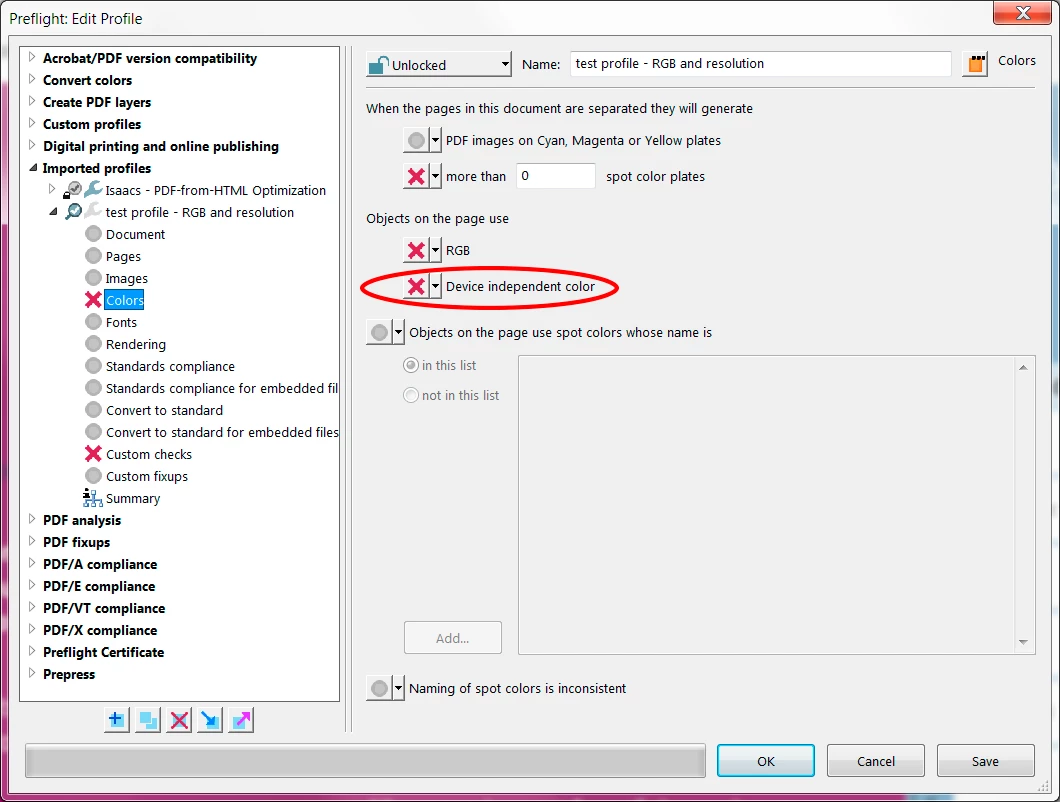
The problem was that you were testing for RGB as an error. The objects in the test file you provided were not DeviceRGB, but rather ICC sRGB. Testing for RGB doesn't yield a positive result for ICC color-managed RGB. For that you need to add a test for “Device independent color.”

Adding that simple test to your profile fixes it to work as (I think) you intended it to.

Hope that this helps and again, sorry for the delay in response!

              - Dov

2 replies

Participant
September 27, 2021

I know I am late to the discussion but these are they areas in AA's Production Tools where I check for RGB. One is in the Color Overview and the other is in the Preflight tab under Colors. See screen shots. This has given me successful reads on the document to be confident there are no RGB remnants around.

Dov Isaacs
Legend
January 24, 2016

Here at Adobe, we are not at all aware of such an issue. Please contact me via a private message on this forum or post both the profile and the PDF file such that we can examine the issue here. Thanks.

           - Dov

- Dov Isaacs, former Adobe Principal Scientist (April 30, 1990 - May 30, 2021)
alidabbs
alidabbsAuthor
Inspiring
March 1, 2016

Bump. Any news on this? Or should I resign myself to the possibility that Acrobat's Preflight doesn't always give accurate reports?

Dov Isaacs
Dov IsaacsCorrect answer
Legend
March 1, 2016

Sorry for delay. Was travelling internationally for several weeks.

There isn't a problem with Acrobat Preflight, but rather with the profile you provided or maybe better described your understanding of how the profile works.

The problem was that you were testing for RGB as an error. The objects in the test file you provided were not DeviceRGB, but rather ICC sRGB. Testing for RGB doesn't yield a positive result for ICC color-managed RGB. For that you need to add a test for “Device independent color.”

Adding that simple test to your profile fixes it to work as (I think) you intended it to.

Hope that this helps and again, sorry for the delay in response!

              - Dov

- Dov Isaacs, former Adobe Principal Scientist (April 30, 1990 - May 30, 2021)