
Natalie_Ping
Inspiring
July 16, 2020
Answered

Custom script to show a field if values are equal to or greater than 1

  • July 16, 2020
  • 1 reply
  • 647 views

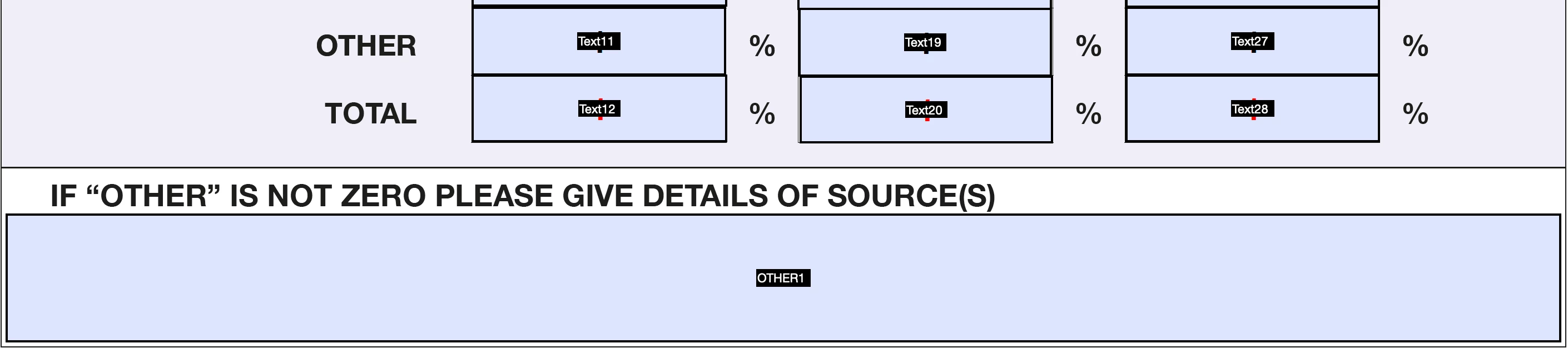
I'm new to editable PDF's and a novice at Javascript. I have three number fields (Text11, Text19, Text27) that if the value inside any one of them is one or higher - I need it to unlock another box below (OTHER1). Does anyone know how I programme this with custom script? 
 

Thanks!

This topic has been closed for replies.
Correct answer try67

You can do it using this code as the custom calculation script of the text field:


var v1 = Number(this.getField("Text11").valueAsString);
var v2 = Number(this.getField("Text19").valueAsString);
var v3 = Number(this.getField("Text27").valueAsString);
event.target.readonly = (v1>=1 || v2>=1 || v3>=1);

1 reply

try67
Community Expert
try67Community ExpertCorrect answer
Community Expert
July 16, 2020

You can do it using this code as the custom calculation script of the text field:


var v1 = Number(this.getField("Text11").valueAsString);
var v2 = Number(this.getField("Text19").valueAsString);
var v3 = Number(this.getField("Text27").valueAsString);
event.target.readonly = (v1>=1 || v2>=1 || v3>=1);

Natalie_Ping
Inspiring
July 16, 2020

Thank you! That has worked!