


Participant
March 8, 2017
Answered

Date Field: A New Feature on Acrobat DC from February 28, 2017

  • March 8, 2017
  • 2 replies
  • 1248 views

I see that Adobe Acrobat Pro DC now allows support for date and image fields in Acrobat forms per the link here: What's new in Adobe Acrobat DC

However, I don't see that ability on my Acrobat Pro DC.
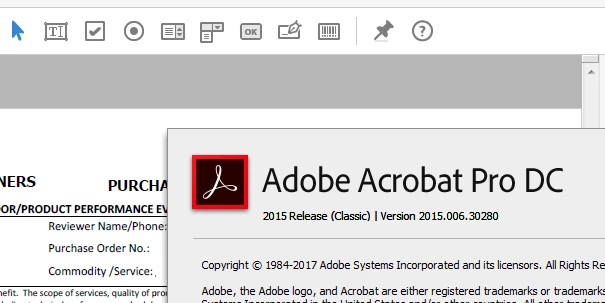
Has anyone had success yet?

This topic has been closed for replies.
Correct answer George_Johnson

An image field is nothing more than a button with a layout other than "Label only" and the following Mouse Up JavaScript:

// Mouse Up script

event.target.buttonImportIcon();

What's new is that Reader now supports the import of image formats (JPEG, PNG, TIFF, GIF), not just PDF. You've been able to set this up since JavaScript was first possible with Acrobat 3.5.

Similarly, a date field is nothing more than a text field with the format set to Date. What's new is that Reader and Acrobat will include a date picker, even if the form was created with a previous version of Acrobat.

2 replies

George_JohnsonCorrect answer
Inspiring
March 9, 2017

An image field is nothing more than a button with a layout other than "Label only" and the following Mouse Up JavaScript:

// Mouse Up script

event.target.buttonImportIcon();

What's new is that Reader now supports the import of image formats (JPEG, PNG, TIFF, GIF), not just PDF. You've been able to set this up since JavaScript was first possible with Acrobat 3.5.

Similarly, a date field is nothing more than a text field with the format set to Date. What's new is that Reader and Acrobat will include a date picker, even if the form was created with a previous version of Acrobat.

try67
Community Expert
Community Expert
March 8, 2017

These features are only available in the Continuous track, not the Classic track, I believe.