Participant
June 30, 2020
Question

Date picker day is incorrect.

  • June 30, 2020
  • 3 replies
  • 674 views

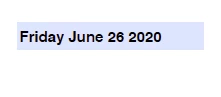
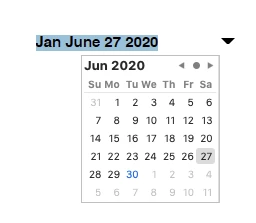
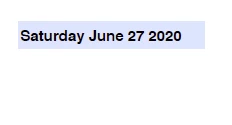
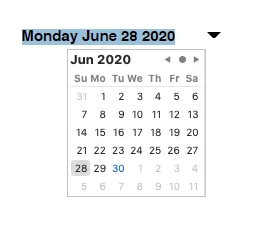
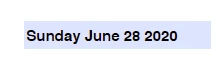
I am using the date picker calendar in a form on a MacOS 10.15.5 with Adobe Acrobat Pro DC 2020.009.20067.  The customs format is dddd mmmm dd yyyy. When a date is picked the initial day is incorrect, however, when the date is selected the correct day is shown. 

Sunday -> Monday

Monday -> Tuesday

Tuesday -> Wednesday

Wednesday -> Thursday 

Thursday -> Friday

Friday -> Saturday 

Saturday -> Jan
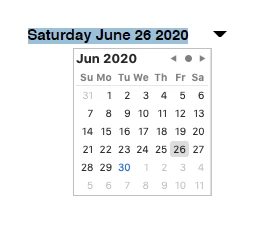
 

The pictures above show the wrong day being displayed during the picking process and the correct day being displayed after the date is selected. The problem is further compounded with console.println(this.getField("Date_af_date").value); displaying Jan June 27 2020 (the incorrect day).

This topic has been closed for replies.

3 replies

sjsilveraAuthor
Participant
August 7, 2020
  • Update Acrobat to its latest version update
    • I have updated 20.9.20074 and no change
  • If the problem persists after updating, can you confirm if this is happening with every PDF that you create or just that one document?
    • I have the issue with every PDF I create.
  • If the update didn't resolve the isse, can you also confirm if clicking on Help--->>> "Repair Installation resolves the issue?
    • I cant find that option on my menu.
  • If the repair installation method didn't resolve the issue don't use "Date_af_date" for a date field name. Right-click on the field, and select from the context menu "Rename". Don't use the field porperties dialogue box...I've noticed that when you change a date field name using the dialogue box it renames the field but doesn;t get rid of this part "_af_date"
    • I have several PDFs with various names for the date fields and they all have the same problem.
  • Check what the localization, the time,  and the time zone and regional format data of your operating are set to 
    • My time zone is correct and below is my localization info.
ls_rbls
Community Expert
Community Expert
August 7, 2020


Use this guidance if  repairing the installation doesn't work(or is not included in Acrobat for macOS):


Additional troubleshooting tips here: 


Bernd Alheit
Community Expert
Community Expert
August 7, 2020

Is the field empty before you select a date?

sjsilveraAuthor
Participant
August 7, 2020

I had a default value in the date field.  I removed the default date and I still have the problem. The work around I am currently using is to type the date in the field and not pick it from the drop down calendar.

ls_rbls
Community Expert
Community Expert
August 7, 2020

That is weird. I am not getting that problem on my end.


I did noticed that at the time that you posted this question you were missing a few updates in your Acrobat version.


So here's a few ideas:


  • Update Acrobat to its latest version update
  • If the problem persists after updating, can you confirm if this is happening with every PDF that you create or just that one document?
  • If the update didn't resolve the isse, can you also confirm if clicking on Help--->>> "Repair Installation resolves the issue?
  • If the repair installation method didn't resolve the issue don't use "Date_af_date" for a date field name. Right-click on the field, and select from the context menu "Rename". Don't use the field porperties dialogue box...I've noticed that when you change a date field name using the dialogue box it renames the field but doesn;t get rid of this part "_af_date"
  • Check what the localization, the time,  and the time zone and regional format data of your operating are set to