Participant
July 21, 2016
Answered

DC Text Properties stopped working with 2015.017.20050 update

  • July 21, 2016
  • 1 reply
  • 772 views

My text properties bar just stopped working with this new update. Should I just restore to a previous date and forget this update (for now)? Or, are others having this issue with possibly a patch? (windows 7)

This topic has been closed for replies.
Correct answer AshuMittal9644438

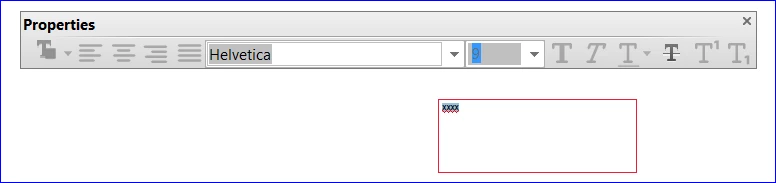
fyi, just completely uninstalled and reinstalled DC with current download. (2015.017.20050) Also ran "repair" again. No Change.The text box properties (box) is still not working. Only the Italic button works. This needs an immediate fix. The complete text properties access needs to be restored asap.

Current appearance:

Hi,

We have released an update today that fixes the Properties Toolbar issue and you can now continue to use it outside the Commenting app as well. Please open Acrobat or Reader DC and visit Help > Check for updates to make sure you are on the latest patch.

Details about the release: https://helpx.adobe.com/acrobat/release-note/acrobat-dc-august-02-2016.html

Please let us know how it goes.

Thanks,

-ashu

1 reply

Adorobat
Participating Frequently
July 21, 2016

Hi keithg19050882 ,

Could you please tell if you are referring to the text box in comment section?

Below is the screenshot :

If yes, then i would like to mention that a bug has been logged for this and our team is working on it to fix it.

Thank You for the patience.

Participant
July 21, 2016

Yes, precisely the text box you indicated. I am reinstalling DC now to see if I can revert it to a working state. I will keep checking for any fixes to this bug before I apply this recent update (if that's even possible...) Thanks,

Participant
July 21, 2016

fyi, just completely uninstalled and reinstalled DC with current download. (2015.017.20050) Also ran "repair" again. No Change.The text box properties (box) is still not working. Only the Italic button works. This needs an immediate fix. The complete text properties access needs to be restored asap.

Current appearance: