


ayanashy
Participating Frequently
December 6, 2018
Question

Dependent dropdown menus in Acrobat forms

  • December 6, 2018
  • 7 replies
  • 689 views

I am creating a form that has 2 dependent dropdowns.  The first box has 4 choices.  The second one will vary depending on the 1st.  I am new to java, so I copied a script and edited it.  I am receiving an error when trying to apply my script.  The error and the script and both below.  Please help!  Thanks!

Acrobat Standard DC

Win 10 Enterprise
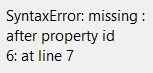
Here is my script:

++++++++++++++++++++++

myDropdown4Values = ["","Profitable growth", "Optimal outcomes", "Top talent", "Operational excellence"];

this.getField("Dropdown5").setItems(myDropdown4Values);

var Strategy = {

Profitable growth: ["","Diversification","Differentiation","Sales pipeline","Existing product innovation","New product innovation","Geographical expansion"],

Optimal outcomes: ["","Access","Quality","Risk Score Accuracy","Comprehensive Health","Utilization Management","Data Interfaces","Provider Collaboration","Individual Engagement","Stakeholder Satisfaction"],

Top talent: ["","Diversity and Inclusion","Culture and Infrastructure","Talent Management","Talent Recruitment","Talent Development","Thought Leadership","Learning and Growth"],

Operational excellence: ["","Go-to-Market Discipline","Security & Compliance","Cross-Functional Optimization","Data Analytics","Customer Service","Capacity Management","Seamless Integration"],

};

function SetFieldValues(cStrategy)

{

this.getField("Dropdown2").setItems(Strategy[cStrategy]);

}

Custom Keystroke Dropdown 4

if( event.willCommit )

{

if(event.value == "")

this.getField("Dropdown5").clearItems();

else

SetFieldValues(event.value);

}

This topic has been closed for replies.

7 replies

ayanashy
ayanashyAuthor
Participating Frequently
December 7, 2018

Here's the current script:

myDropdown4Values = ["","Profitable growth", "Optimal outcomes", "Top talent", "Operational excellence"];

this.getField("Dropdown4").setItems(myDropdown4Values);

var Strategy = {

"Profitable growth": ["","Diversification","Differentiation","Sales pipeline","Existing product innovation","New product innovation","Geographical expansion"],

"Optimal outcomes": ["","Access","Quality","Risk Score Accuracy","Comprehensive Health","Utilization Management","Data Interfaces","Provider Collaboration","Individual Engagement","Stakeholder Satisfaction"],

"Top talent": ["","Diversity and Inclusion","Culture and Infrastructure","Talent Management","Talent Recruitment","Talent Development","Thought Leadership","Learning and Growth"],

"Operational excellence": ["","Go-to-Market Discipline","Security & Compliance","Cross-Functional Optimization","Data Analytics","Customer Service","Capacity Management","Seamless Integration"],

};

function SetFieldValues(cStrategy)

{

this.getField("Dropdown5").setItems(myDropdown4Values);

}

Bernd Alheit
Community Expert
Community Expert
December 7, 2018

You use for Dropdown4 and Dropdown5 the same values.

Why does you remove .setItems(Strategy[cStrategy]); ?

ayanashy
ayanashyAuthor
Participating Frequently
December 7, 2018

Thank you for your help!!!

I made the changes, and the 2nd box still does not populate with the corresponding options.  The 2nd box gives me just the initial 4 options.

ayanashy
ayanashyAuthor
Participating Frequently
December 7, 2018

I have that line in the script but Dropdown5 still has the same options that Dropdown4 has.  The 2nd list doesn't change at all.

Bernd Alheit
Community Expert
Community Expert
December 7, 2018

You doesn't change the 2nd list.

ayanashy
ayanashyAuthor
Participating Frequently
December 7, 2018

Dropdown5.  The 1st box is Dropdown4.

Bernd Alheit
Community Expert
Community Expert
December 7, 2018

You set the items here:

this.getField("Dropdown5").setItems(myDropdown4Values);

ayanashy
ayanashyAuthor
Participating Frequently
December 7, 2018

OK.  I added the quotes as suggested, and the 2nd box shows the 4 options for the 1st box.  Please help!

Bernd Alheit
Community Expert
Community Expert
December 7, 2018

What is the name of the 2nd box?

ayanashy
ayanashyAuthor
Participating Frequently
December 7, 2018

Hello!  They are all in quotes.  I went through the entire script twice to make sure they all are.  Any other suggestions?

Bernd Alheit
Community Expert
Community Expert
December 7, 2018

They are not all in quotes.

ayanashy
ayanashyAuthor
Participating Frequently
December 7, 2018

myDropdown4Values = ["","Profitable growth", "Optimal outcomes", "Top talent", "Operational excellence"];

this.getField("Dropdown5").setItems(myDropdown4Values);

var Strategy = {

Profitable growth: ["","Diversification","Differentiation","Sales pipeline","Existing product innovation","New product innovation","Geographical expansion"],

Optimal outcomes: ["","Access","Quality","Risk Score Accuracy","Comprehensive Health","Utilization Management","Data Interfaces","Provider Collaboration","Individual Engagement","Stakeholder Satisfaction"],

Top talent: ["","Diversity and Inclusion","Culture and Infrastructure","Talent Management","Talent Recruitment","Talent Development","Thought Leadership","Learning and Growth"],

Operational excellence: ["","Go-to-Market Discipline","Security & Compliance","Cross-Functional Optimization","Data Analytics","Customer Service","Capacity Management","Seamless Integration"],

};

function SetFieldValues(cStrategy)

{

this.getField("Dropdown2").setItems(Strategy[cStrategy]);

}

Custom Keystroke Dropdown 4

if( event.willCommit )

{

if(event.value == "")

this.getField("Dropdown5").clearItems();

else

SetFieldValues(event.value);

}

Ayana Shy, MBA

[Personal contact info removed - Mod]

try67
Community Expert
Community Expert
December 6, 2018

All of your strings need to be in quotes, such as "Profitable growth", "Operational excellence", etc.