


Inspiring
September 11, 2017
Answered

Developer 101. The proper way forward from Acrobat 5?

  • September 11, 2017
  • 4 replies
  • 7010 views

Out of utter frustration and exhaustion, I'm posting an open ended question, hoping to get in touch with someone from adobe to further discuss this issue.

I've been tasked with supporting a legacy application that uses Winforms to host an Acrobat 5 fillable form.  We have hundreds of pdf fillable forms with javascript logic, emphasis on *hundreds*, therefore we are heavily invested in Adobe.  (However, if we can not find a satisfactory solution to our issues we will be moving away from the Adobe platform).

The application basically presents the user with a fillable pdf, the user can fill out the pdf and save the results.  Very straight forward.

However, I'm finding it exceedingly difficult to upgrade and support our code to use the newer versions of Adobe and newer ways of saving the user choices.  We are tired of wasting hours and hours pouring through Adobe's voluminous documentation, that never really gets to the point nor provides answers to basic developers questions. 

By the way, the Adobe DC sdk is 99% worthless and is, by all definitions, a misnomer.  It is NOT an sdk of any kind and will leave the developer with more questions than answers.
This topic has been closed for replies.
Correct answer Michael Peters

Michael,

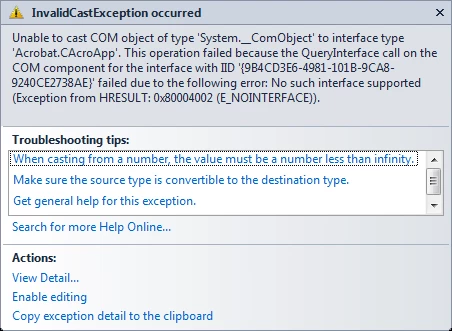
Would you know how to fix this?  This code used to work just fine... but now we're getting this error and don't know why.

This line of code

avapp = (Acrobat.CAcroApp)Activator.CreateInstance(System.Type.GetTypeFromProgID("AcroExch.App"));

Produces this error:


Is this the same machine with the dual Acrobat 5 and Acrobat DC installation? If so, have you tried removing the Acrobat 5? I personally would remove both and then reinstall Acrobat DC.

I presume that your application is also 32 bit as even Acrobat DC is still 32 bit?

4 replies

Jon Fritz
Community Expert
Community Expert
September 20, 2017

There's really no reason to continue this thread with this particular back and forth. If anyone sees a valid reason to unlock it, PM me.

Legend
September 11, 2017

Never seen them but I believe interop files are automatically generated by .net developer tools from supplied DLLs. consult .net documentation,  nothing specific to the acrobat SDK.

Inspiring
September 12, 2017

Test Screen Name: I created a separate posting to address this exact issue: 

where are the .dlls to make the SDK examples work?

Inspiring
September 14, 2017

You will need to regenerate the interop references for the examples in visual studio.

Legend
September 11, 2017

Not much has changed in Acrobat If you are using IAC. little has changed incompatible in JavaScript for security issues and the loss of ADBC. Not much has changed in Reader either, it still offers no useful API. Can you be specific about some issues?

Karl Heinz  Kremer
Community Expert
Community Expert
September 11, 2017

A PDF form is not an "Acrobat 5 fillable form" or an "Acrobat DC fillable form" - it's a PDF form, and should work on any version of Adobe Acrobat (or the free Adobe Reader). What problems exactly are you running into with your form when you use it in Acrobat/Reader DC?

Inspiring
September 11, 2017

Hello Karl,

Here is some more information:

Platform:

1. Our platform's are the Microsoft Windows 7 and Windows 10 operating systems.

Overview of our app:

1. Our legacy winforms application allows our field agents to work in a disconnected mode, where they can download a fillable pdf form on a laptop, physically drive to a remote location, fill out the form and save it, return to the office and upload the values from the saved pdf form to a database, if the form data has been uploaded it can be downloaded and viewed in *read only* form.

Overall questions:

1. The Adobe DC sdk doesn't contain the all .dlls necessary for developing.  So that's the #1 issue.  Where can we get those?  (things like Interop.Acrobat.dll, Interop.AFORMAUTlib.dll, etc).  Supposedly the licensed Adobe DC Professional installs these, but we can't locate them. The sdk's don't even clearly document what .dll's are available, plus the discovery of the available capabilities and how to properly use them is virtually non-existent.  The sdk's should contain everything needed to get started and the current sdk's are crap. 

2. Once we get the proper .dlls, it's not clear what SDK will meet our needs.  Do we use the "Adobe Pdf Sdk" or the "Adobe Acrobat DC Sdk", or god knows, is there something else to research?  And, yes, we've poured over the comparison documents, but those documents don't clearly indicate which SDK allows the developer to get/set controls and handle the .pdf javacode errors.

3.  What we're trying to do is straight forward and not hard.  So why is it so complicated?

4. Our winforms application is 10 years out of date and needs to be replaced.  Our initial thinking is upgrading it to WPF.  It doesn't appear that the pdf .dlls play well inside of WPF.  Is this correct?  If not, can Adobe supply us with a WPF example? 

5. What is the easiest way to get/set fillable forms data?  Right now the app iterates over the control names and selectively get/set the values.  Is there an easier built-in way using xml data?  This seems like such a basic question, but we're not able to tease out the answer from the documentation.  BTW, let me reiterate the poor quality of documentation for developers.

6. What does Adobe recommend we do?  Is upgrading from Winforms to WPF the way to go?  Or should we go HTML5?  We know this question not straight forward. 

7. Our development computers upgraded to Adobe DC professional, but it looks like the visual studio 2012 setup programs, create on these upgraded pc's are producing setup files that break our legacy laptops (running Windows 7 and Acrobat 5).  We don't know what's causing this error:

Unable to case COM object of type 'System.__ComObject' to interface type 'Acrobat.CAcroApp'.  This operation failed because the QueryInterface call on the COM component for the interface IID '{...}' failed due to the following error: No such interface supported.

Karl Heinz  Kremer
Community Expert
Community Expert
September 11, 2017

#1 The SDK is mostly a collection of documentation and examples. All the DLLs you need are distributed with Adobe Acrobat (or the free Reader for the limited amount you can do with Reader). There are no other DLLs, there are no redistributable DLLs that you would package with your code. You need to have Adobe Acrobat installed in order to use it via the methods documented in the SDK.

#2 The Acrobat SDK contains several different APIs. The most important ones are the plug-in API to develop Acrobat plug-ins in C++, the JavaScript API, and the IAC or Interapplication Communication API to automate Acrobat from e.g. a VB or C# application. You would also use IAC to display a PDF in your own application.

#3 There is a learning curve associated with the Acrobat SDK. It's not something you pick up on an afternoon or over a weekend. You need to be prepared to read a lot and analyze the samples that come with the SDK.

#4 Chances are that Adobe will not provide you with anything besides what is already in the SDK unless you are willing to pay for a support case.

#5 Iterating over all fields is what I would do. You can certainly use e.g. the Javascript API to write out an XML file. If you already know what fields are in a form, you don't have to iterate over the fields, you can just retrieve the information directly. See here for some sample code that shows how you would do this using IAC: Reading PDF Form Fields with VBA - KHKonsulting LLC

#6 You are posting in a forum that mostly frequented by users of Adobe's technology, so this is not a method to get in touch with Adobe's support. Chances are that Adobe will not provide you with guidance in regards to how to design your system (unless you pay for a support case).

#7 We need a bit more information about what exactly it is you are trying to do. Please show some code or explain how your project is set up and what API(s) you are using.