
Participant
August 24, 2021
Question

Digital Sign verification after append a new page in Signed PDF

  • August 24, 2021
  • 2 replies
  • 729 views

I have a issue In multiple Digital Signature in PDF File using USB Token. I am using open source dll itextSharp for digital Sign and i am trying to multiple Sign in PDF File.
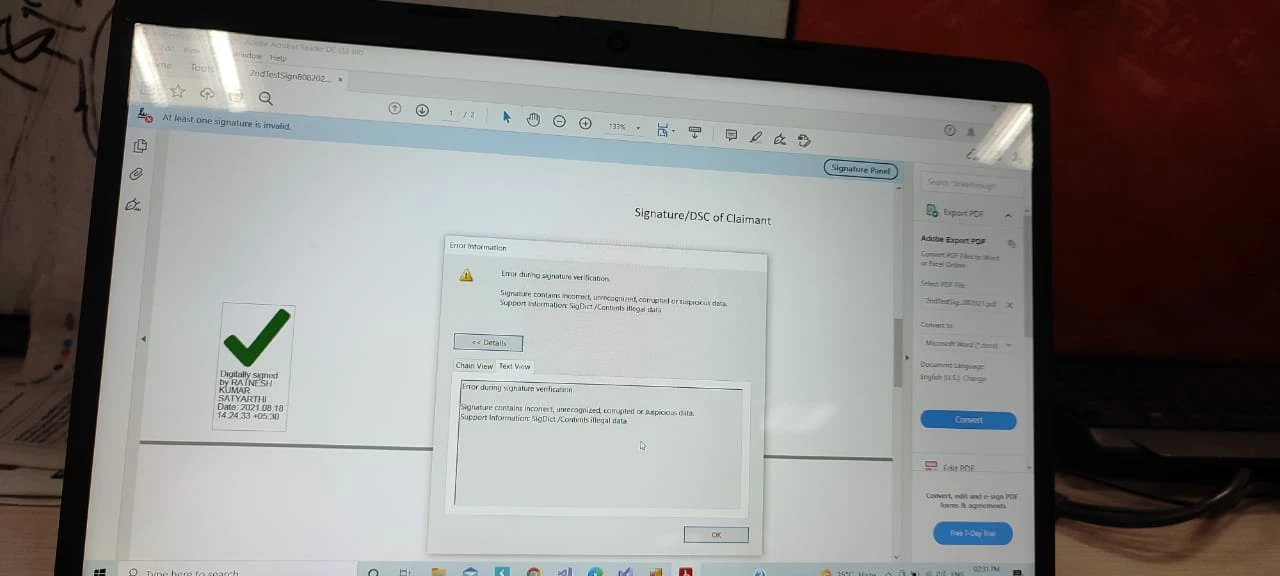
In this scenario user (A) have sign a single page PDF File, and after that append or merge another page in same PDF file and  user (B) Sign in another page sucessfuly. but in this case only one signature is verfied other one is unverfied.

So above scenario how we can verify digital Signature in PDF file after append new page?
 

This topic has been closed for replies.

2 replies

MikelKlink
Participating Frequently
August 24, 2021

On one hand, as Test Screen Name already has hinted at, only a small set of changes is allowed to a signed PDF and appending or merging another page surely is not in that set. For some backgrounds read this stack overflow answer.


And on the other hand there is an additional issue: "SigDict /Contents illegal data" indicates that you did not apply the changes to the signed document as an incremental update (in iText lingo: in append mode). Thus, you also changed the bytes in the signed byte ranges and so invalidated the signature, no matter what you actually added to the document.


Thus, you have to restrict yourself to the allowed changes to a signed document and you have to apply those changes as incremental update.

Legend
August 24, 2021

Your scenario cannot work. Everything in digital signatures is designed to make this impossible.


Why? Imagine a digitally signed contract to buy a house. Now imagine allowing an extra page to be added to the contract, which would mean the house returned to its original owner after a year. The signature is specifically designed to protect against the fraud of changed contracts, and so it must block it.