Distribute form fields horizontally and vertically: backwards
I've noticed this for quite some time. I figured someone would point it out eventually and a future version of Acrobat DC would fix it... but that hasn't happened.
When multiple form fields are selected in Acrobat Pro, you can choose to distribute them vertically or horizontally.
Vertical distribution is represented by parallel vertical lines and boxes and horizontal is represented by horizontal lines and boxes.
This could be an acceptable icon interpretation (and an understandable mix-up from the GUI developers) except that it's the exact opposite as Adobe Illustrator - which has vertical parallel lines for horizontal distribution and horizontal for vertical distribution.
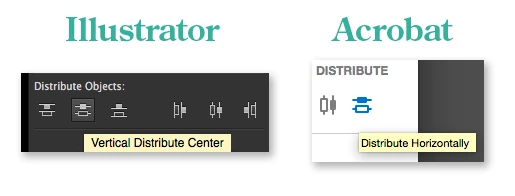
I think the Illustrator interpretation is correct and makes more sense - and it's been around longer.
I didn't know how to get this to someone at Adobe - this is the first time I've posted a discussion on a forum.
Could someone make sure this gets fixed? I always end up clicking on the wrong one the first time around.
possibly irrelevant details:
Current Acrobat Version: Adobe Acrobat Pro DC, 2015 Release, 2015.010.20056
But I've seen this issue since the first time I used the new distribute function in Acrobat.
System: 2014 Retina iMac, OSX 10.11.4
 AdChoices