Gojudiver
Participating Frequently
August 22, 2017
Answered

Dynamic Dropdown list in Adobe Acrobat Pro XI

  • August 22, 2017
  • 2 replies
  • 5703 views

Ok guys and gals.  I'm going nuts here. I have been doing a lot of research on a dynamic drop down list for adobe acrobat pro XI.  I've seen a few things but nothing is working.  Here is what I am trying to do.  I have two drop down boxes in a form titled "Status" and "Rank."  I want Status to have two labels to chose from; NCO and OFFICER.  In the "Rank" field I want the list of either all of the NCO or Officer ranks to appear for selection based upon which option is chosen in the field "Status."  I tried this script which has gotten me the closest but only displays the data in the "Rank" field for NCO when NCO is the first item in the list in the "Status" field and the data that does appear in the "Rank" field does not display as drop down options.  Rather, it displays as a line of text with commas.  If I chose the Officer item as the 2nd item in the list, I get no change in the "Rank" field.  It stays populated with the original NCO data.   grrrrrr.  This script may be too simple and not what I need but it functioned closer than anything else I found.  Here is what that script looks like:

switch (event.value)  {

    case "NCO":

         this.getField("Rank").setItems("PV1,PV2");

         break;

    case "Officer"

         this.getField("Rank").setItems("2LT, 1LT");

         break;

}

This topic has been closed for replies.
Correct answer try67

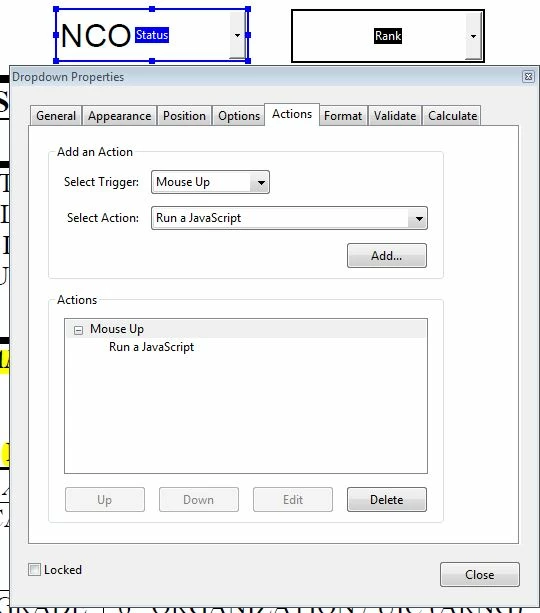
Again, I thank you very much for your time.  No, sir.  No errors in the console and I did activate it.  It does pop up occasionally when I execute an error but it is not giving me any warnings in this case.  I put the script into the actions tab in the properties box.  See below:

Here are my results:


You need to use it as the custom Validation script. Also, make sure to tick the option to commit the selected value immediately, under the Options tab.

2 replies

try67
Community Expert
Community Expert
August 22, 2017

The values need to be individual strings in an array, like this:

setItems(["PV1", "PV2"])

Gojudiver
GojudiverAuthor
Participating Frequently
August 23, 2017

Thank you so much for your attention.  I tried it and saw the obvious errors in my last submission.  The new code did make a change but were not quite there.  Now, the Rank field (the Target field) is not populating with any data.  It is blank for either option I select in the Status Field.  I am inserting a picture to display the exact code as is cut and pasted into the pdf from Notepad.  I tried removing the space between the comma and PV2.  Didn't think it would really help but I tried.  No go. 

Gojudiver
GojudiverAuthor
Participating Frequently
August 23, 2017

This thread is where I originally got the script:

https://forums.adobe.com/thread/1622758

I'm looking letter by letter and I just don't see anymore mistakes.  This script seemed to work for others.  I just don't know.

Gojudiver
GojudiverAuthor
Participating Frequently
August 22, 2017

Oh, yeah....almost forgot.

I am running Windows 7 Enterprise

64 bit OS

Adobe Acrobat XI Ver: 11.0.20