
Dynamic Stamp - 4 fillable fields help
Hello,
I'm trying to make a stamp with 4 fillable fields. I don't need any date scripts since the employee wants to type in any date she needs. I've never done scripting so I've been searching everywhere for the basic script that I could just change some name fields. I thought I had it but when applying the stamp no editable box pops up, just places the stamp as static.
This is my stamp:
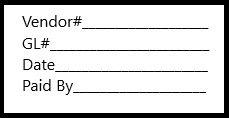
This is the script I tried:
if (event.source && event.source.forReal && event.source.stampName == "#AP Stamp")
{
this.getField("Vendor").value = app.response("Vendor:");
this.getField("GL").value = app.response("GL");
this.getField("Vendor").value = app.response("Date");
this.getField("Vendor").value = app.response("Paid By");
}
Any help would be GREATLY appreciated,
Thank you


 AdChoices