
Participant
November 20, 2019
Answered

Dynamic Stamp

  • November 20, 2019
  • 3 replies
  • 3212 views

Having an issue when creating a dynamic stamp. I am entering in a custom javascript and select that when creating my form on the dynamic stamp. When I hit okay, it automatically sets it back to "Field not calculated" instead of keeping my javascript. I even made an error at first and it called that out, I corrected it and it seemingly won't let me have that script be entered. here is what I am entering


var cAsk = "Enter POI Number" ;

var cTitle = "POI Number:  ";

if(event.source.forReal && (event.source.stampName == "#mH2CRwgU97QYytFkFHMANC"))

{

  var cMsg = app.response(cAsk, cTitle);

  event.value = cMsg;

  event.source.source.info.exhibit = cMsg;

}

This topic has been closed for replies.
Correct answer Thom Parker

Right I double checked that, and I am using the stamp name in the user stamps folder. I tried to recreate it so now I have a different stampName, seen below and this is where I am getting it from


var cAsk = "Enter POI Number" ;
var cTitle = "POI Number: ";
if(event.source.forReal && (event.source.stampName == "#biB4tIWRwdqM4zhdqaW_MC"))
{
var cMsg = app.response(cAsk, cTitle);
event.value = cMsg;
event.source.source.info.exhibit = cMsg;
}

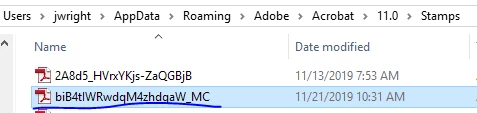
 

Also, I noticed that the debugger pops up showing this message:

TypeError: event.source is null
3:Field:Calculate


I am not too sure how to remedy that or if that is the cause of it not showing up


That error is from editing the stamp file, not from running it. It's not a problem, but if you want it to go away, then follow Try67's suggestion in his post at the bottom of the thread.


The stamp name is not the file name. The stamp name is part of the page template for the page that is the stamp.

Open up the "Organize Pages" tab and select the "More > Page Templates" menu item. You'll see the template name here.  


You can also get the template name be placing the stamp on a PDF page, selected it, and then running this code in the Console Window


selectedAnnots[0].AP

3 replies

try67
Community Expert
Community Expert
November 21, 2019

Change this line:

if(event.source.forReal && (event.source.stampName == "#mH2CRwgU97QYytFkFHMANC"))

To:

if (event.source && event.source.forReal && event.source.stampName == "#mH2CRwgU97QYytFkFHMANC")

Thom Parker
Community Expert
Community Expert
November 20, 2019

The problem is with Acrobat, not the script. I've seen this when using an external editor for scripts. I think Bernd's idea is a good one. Try creating a new field and starting over.  

Thom Parker - Software Developer at PDFScriptingUse the Acrobat JavaScript Reference early and often
Participant
November 20, 2019

Thanks guys, I did create a new field and finally got the script in there. Closed the form editing and saved, however, now I am not getting the script to run when I post the stamp. Prompts aren't showing up to enter in the values

Thom Parker
Community Expert
Community Expert
November 20, 2019

Did you copy the stamp file the correct location?

Did you restart Acrobat after copying the stamp file?


Thom Parker - Software Developer at PDFScriptingUse the Acrobat JavaScript Reference early and often
Bernd Alheit
Community Expert
Community Expert
November 20, 2019

Try this:

Create a new field with this script.