
Participating Frequently
January 28, 2016
Answered

Enabling Reader plug-in.

  • January 28, 2016
  • 1 reply
  • 2114 views

I wrote plug-in for Adobe Reader.

Now I have exception:
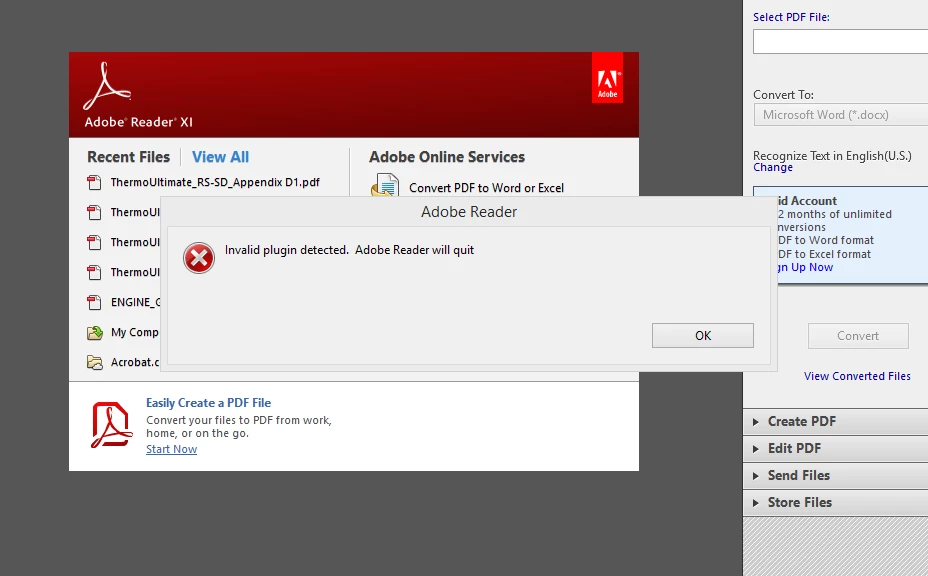
Just in case I unchecked the “Use only certified plug-ins” Reader’s setting and nothing (‘Certified plug-ins only’ = Edit > Preference: Application Startup: Use only certified plug-ins (unchecked)).

I modified AcroDspOptions.rsp as in documentation.

My plug-in based on the "BasicPlugin" project from the samples in the Acrobat SDK.

I don't have digital certificate.
I have Acrobat XI SDK.

What is wrong? Can I enable plugin without digital certificate?

This topic has been closed for replies.
Correct answer Bernd Alheit

I red about Adobe Reader Integration Key License (RIKLA) Program.

When you use the plugin in Adobe Acrobat you don't need the key.

If I want use my plug-in in Adobe Acrobat Reader I don't need send my public key and key pair to Adobe. Am I right?

PS: thanks a lot for your time.


‌Not correct. For Acrobat Reader you need the key from Adobe.

1 reply

Bernd Alheit
Community Expert
Community Expert
January 28, 2016
Participating Frequently
January 28, 2016

No, I think it isn't. I didn't sign plugin.

Menu has been added and I saw it on menubar.

Can I enable plugin without sign?

Bernd Alheit
Community Expert
Community Expert
January 28, 2016

‌For the use with Acrobat Reader you need the key.