
KyedDesign
Participant
February 11, 2016
Answered

Encode URLs to ISO-8859..?

  • February 11, 2016
  • 1 reply
  • 826 views

Hi..


I am trying to open a Google Maps URL from 4 filled variables via a form in Acrobat.

I am using this Javascript code:

var Adresse = getField("Adresse").value;

var Nr = getField("Nr").value;

var Postnr = getField("Postnr").value;

var By = getField("By").value;

var myURL = "http://www.google.dk/maps/place/"+Adresse+"+"+Nr+"+"+Postnr+"+"+By;

app.launchURL(myURL, true);

But when having ”æ”, ”ø” and ”å” in the variables, the output URL is not correct. This is my output:

https://www.google.dk/maps/place/H%E6vlingeb%E5nken+17+4681+Herf%F8lge

when typing these variables:
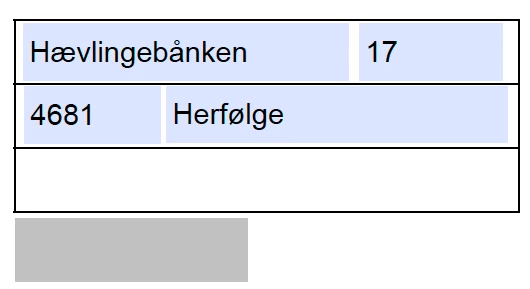
So I need somehow to encode the URL to ISO-8859...or other encoding? so the characters "æ", "ø" and "å" are used correctly...

Is that possible?

This topic has been closed for replies.
Correct answer try67

Remove all of the "replace" commands you added. They should not be necessary after the encodeURI command.


Also, you don't need a function for this, just add this line before the launchURL command:

myURL = encodeURI(myURL);

1 reply

try67
Community Expert
Community Expert
February 11, 2016

Try JS's global encodeURI method.

KyedDesign
Participant
February 11, 2016

Hi try67

Thanks for your reply. I am not a skilled coder, just a graphic designer trying my best to make things work

So I am not sure how to use that method correctly...

From what I can read about the method on that page, I have inserted it like this, but I get a SyntaxError from Acrobat...

Any help writing the exact code is VERY appreciated

try67
Community Expert
Community Expert
February 11, 2016

Remove all of the "replace" commands you added. They should not be necessary after the encodeURI command.