July 11, 2016
Answered

Every time I open a doc it opens at 148%. How to make default opening zoom at 100?

  • July 11, 2016
  • 4 replies
  • 1860 views

Every time I open a doc it opens at 148%. How to make default opening zoom at 100?

Thanks

This topic has been closed for replies.
Correct answer Sarojini_Nagar

Hi dumitruv51327095 ,

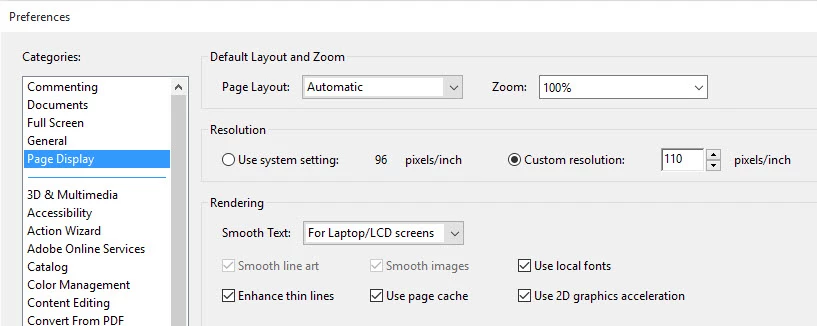
Please try navigating to Edit>Preferences>select "Page display" from the categories and set the zoom level to 100% under the label " Default layout and zoom" . Click OK .
Let us know if this helps .

Regards

Sarojini

4 replies

Participant
April 29, 2020

This does not fix the problem.  If a document has its properties set to open at another zoom, the document will open at that other zoom, not 100%.  How can I ensure that regardless of what zoom the document has set, it will open to 100% zoom?


p.s.  I have Adobe Acrobat XI Pro 11.0.23

ls_rbls
Community Expert
Community Expert
April 30, 2020

I don't know if that is possible in your old version


I am answering based on this reference:


https://helpx.adobe.com/acrobat/11/user-guide.html 


Go to Workspace then see the section about Zooming.


It mentions about how to change it but  it also stresses in a note  that other documents may hold different Page View settings.


If thatis the case, you should consult the enterprise toolkit preferences reference and look for a registry settings that would allow to lock a viewing preference.


https://www.adobe.com/devnet-docs/acrobatetk/tools/PrefRef/Windows/index.html 

July 11, 2016

It worked

Thank you!

Sarojini_Nagar
Community Manager
Sarojini_NagarCommunity ManagerCorrect answer
Community Manager
July 11, 2016

Hi dumitruv51327095 ,

Please try navigating to Edit>Preferences>select "Page display" from the categories and set the zoom level to 100% under the label " Default layout and zoom" . Click OK .

Let us know if this helps .

Regards

Sarojini

July 11, 2016

It worked!

Thanks a lot

Inspiring
July 11, 2016

Change the Preferences for the default view to 100%.