
gtealw
Participant
April 27, 2016
Question

Exporting superscript text problem

  • April 27, 2016
  • 2 replies
  • 3730 views

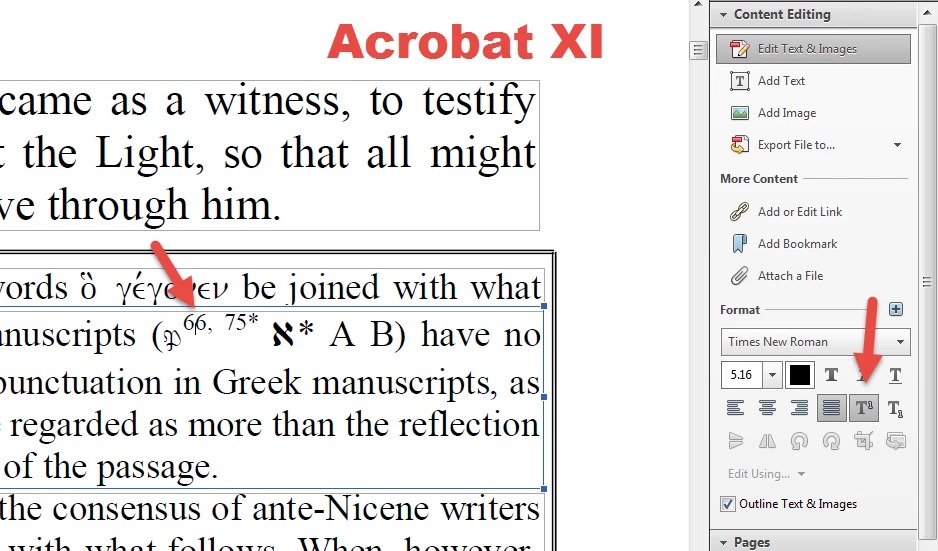
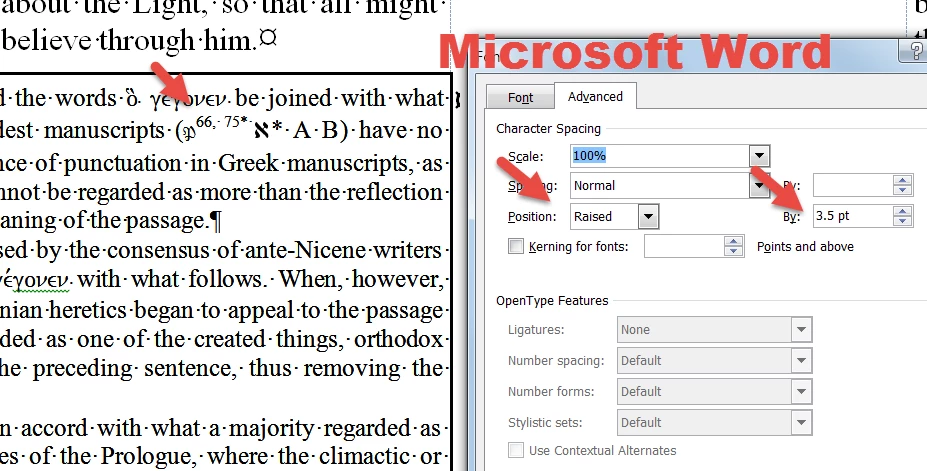
I am using Acrobat XI. When I export a PDF document to Microsoft Word, all of the text and that are formatted as superscript are converted to font formatted as "raised" instead of "superscript". Acrobat knows that it's superscript in Content Editing (see image). Does anyone know why? Is there some configuration that controls the conversion process? Thanks for any help.
This topic has been closed for replies.

2 replies

gtealw
gtealwAuthor
Participant
May 7, 2016

Hello Sukrit,

Are you still helping me with this issue?

Community Manager
May 10, 2016

Hi Andre Wu,

Would it be possible for you to share the sample document?

You can share it via Adobe Send:

https://cloud.acrobat.com/send

Regards,

Anoop

gtealw
gtealwAuthor
Participant
May 10, 2016

Hello Anoop,

Thank you for your help.

I have uploaded files with superscript example: the original pdf and converted docx files. The issue is not unique to one file but all pdf documents that have superscript.

https://files.acrobat.com/a/preview/03e0ebc3-f4b2-4493-972b-3c9b1ac73582

Best Regards,

Andre

April 28, 2016

Hi ,

Please tell the OS you work on.

Do you experience this with any other PDF as well?

Please try to update your Acrobat to the latest patch and see if that helps.

Also if you are on windows,try to repair it as well.

Regards

Sukrit Dhingra

gtealw
gtealwAuthor
Participant
April 28, 2016

I am running Windows 7 Enterprise 64-bit SP1/ Acrobat XI Pro (11.0.15). This is the same behavior with other PDF documents. Even documents I created in MS Word 2010 and then saved as PDF exhibit the same issue.