

DigitalChickster
Inspiring
August 22, 2016
Answered

Exporting tiff files... and have them named ".tif" instead of ".tiff"

  • August 22, 2016
  • 2 replies
  • 2540 views

I am not sure I'm posting this in the right place. Please let me know if that's the case. I'm using Adobe CC on a Mac.

I have to export tiff files from pdfs. Lots of them. Then I run actions on them using Photoshop. When I export from the pdf, the resulting tif files have the extension, ".tiff." But then I run an action, and it names them "name.tiff.tif." Then I have to manually go in and delete the ".tiff" in the middle of the name.

So how can I change the extension from tiff to tif when they first export from Acrobat? I assume that's the quickest way to fix the problem. But let me know if I'm not thinking of an alternate fix. Thanks so much.
This topic has been closed for replies.
Correct answer philippanmei

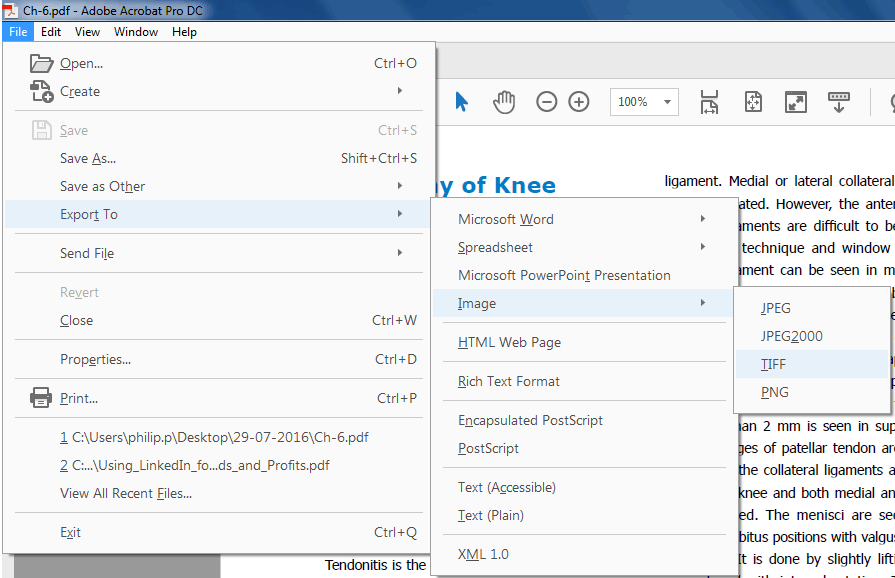
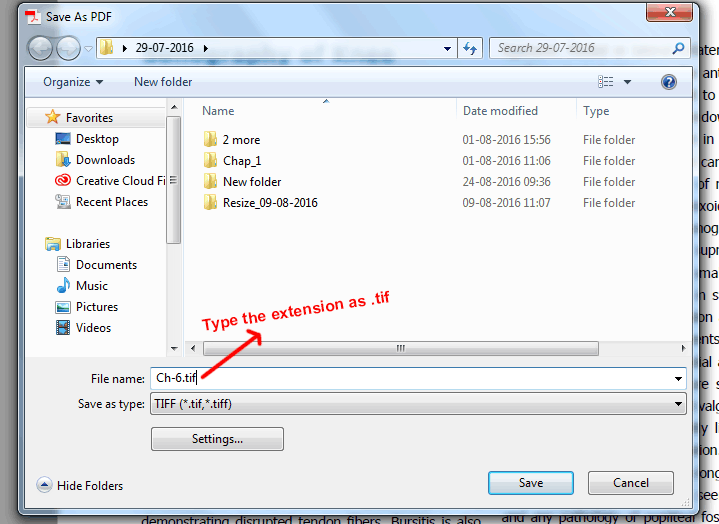
While you are exporting to .tiff from acrobat, you have to give the extension as .tif with the file name. see the image

This step will export your pdf file to .tif file and when do another file to export .tif, it not need to type the extension again it will be default as .tif but if you want to change the extension to .tiff then you have to type it again as .tiff. Hope this will help you.

Thanks

2 replies

philippanmei
philippanmeiCorrect answer
Participating Frequently
August 24, 2016

While you are exporting to .tiff from acrobat, you have to give the extension as .tif with the file name. see the image

This step will export your pdf file to .tif file and when do another file to export .tif, it not need to type the extension again it will be default as .tif but if you want to change the extension to .tiff then you have to type it again as .tiff. Hope this will help you.

Thanks

Johnson156
Participating Frequently
August 24, 2016

Thanks philip

DigitalChickster
Inspiring
August 24, 2016

Thanks so much! That worked. That will save me a lot of time and trouble. And thank for moving this to the correct forum. I must have missed the "Editing and Exporting PDFs" section.

try67
Community Expert
Community Expert
August 23, 2016

[I've moved your question to the Editing & Exporting PDFs forum, where it better belongs]

Are you exporting whole pages to TIFF? If so, then you can do it using a script, where you can specify the file extension to be either "tif" or "tiff".The code to do it is basically this:

this.saveAs({cPath: this.path.replace(/\.pdf$/i, ".tif"), cConvID: "com.adobe.acrobat.tiff"});