Inspiring
March 5, 2019
Answered

Field values not updating immediately, custom calculation script.

  • March 5, 2019
  • 2 replies
  • 2299 views

I have two fields from which I am trying capture the (numeric) values from. They are named BS BEFORE.x and CARBS.x, with x being a value between 0 and 5, depending upon which record number of the current event. In this code snippet I am merely placing the values into a text field named TEST just for display purposes. Ultimately, these values will be used to calculate a recommend dose of fast acting insulin. The problem is, TEXT.value only updates with the value entered into BS BEFORE.x and CARBS.x AFTER the next entry is made.

HERE IS THE CODE:

// THIS IS A TEST FIELD TO SHOW RESULTS

var TEST = this.getField("TEST"); TEST.value = "";

// CAPTURE RECORD NUMBER FROM THE FIELD NAME AND TRIM BLANKS

var RecordNo = event.target.name.substring(event.target.name.length-1);

RecordNo = RecordNo.trim(RecordNo);

// GET THE VALUE OF CURRENT BS AND CARB FIELDS

var myBS= this.getField("BS BEFORE." + RecordNo);

var myCarbs = this.getField("CARBS." + RecordNo);

// SHOW TEST VALUES

TEST.value = myBS.value + " : " + myCarbs.value;

Incidentally, is there a way to do this using calculation without calculating everything in the form?

Message was edited by: Malcolm Thomson - Removing unnecessary caps in title.

This topic has been closed for replies.
Correct answer try67

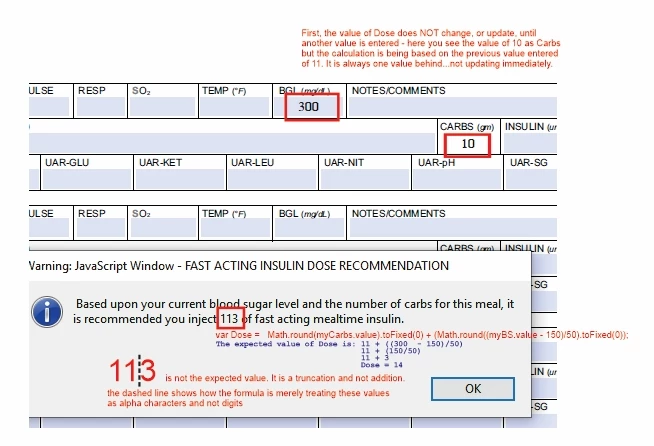
I have a couple of issues. I am still having the calculation updating issue AND my end value is a truncated string and NOT a mathematical value. Please see the image attached.


The toFixed method returns a string. When you combine a string to a number you get a string...

2 replies

Legend
March 6, 2019

If this is a real application, rather than a student project, I'm sure you know better than me that lives depend on the right answer. While I'd hesitantly accept using Acrobat to calculate my tax, I'm not sure I'd want any lives to depend on it (and your code) working right, even if you test it a hundred or a thousand times. I would not want this job, and I've been a software developer for many decades. I'd recommend that if this is to be directly used by any patient, carer or healthcare professional that you have it fully validated by someone familiar with the subject areas, methodology, making provably correct software, and your development tools; and willing to be professionally liable for their judgement.

Inspiring
March 6, 2019

I appreciate the concern about this project being used by a real demographic, but I assure you it is being built for a comparative study - being evaluated in comparison to 3 other applications built on three different platforms. Again, thank you for your concern.

try67
Community Expert
Community Expert
March 5, 2019

Drop the first line and change the last one to:

event.value = myBS.value + " : " + myCarbs.value;

And to answer your question: Not directly. Whenever a value is changed in the file all the fields are re-calculated.

If you want to control it you need to place all of the calculation code in a single function and then look at the name of the field that was changed (via event.source) to determine which calculations to perform. This is quite a complex task and is only really worth it if you have a lot of calculations in your file.

Inspiring
March 5, 2019

I am not changing the value of the event BS BEFORE.x or CARBS.x, I am extracting their values for using in a calculation, which result will be served up in an alert box. So, the problem that the values are not recognized after each change event (validate) of BS BEFORE.x or CARBS.x.

try67
Community Expert
Community Expert
March 5, 2019

Aren't you trying to populate the TEST field? If so, adjust the code as I've described and use it as the custom calculation script of that field.