


Inspiring
July 12, 2017
Answered

Folder level script

  • July 12, 2017
  • 5 replies
  • 3996 views

Hi,

     I need to create menu item when acrobat opens.  So i have placed the script in the path of user level path. when i use the code for app level its working and added menu item but in folder level its not working.

https://acrobatusers.com/tutorials/folder_level_scripts  (Ref)

app.addMenuItem({cName:"JS Ref", cParent:"Help", cExec:"app.openDoc('pathToPDF');"});

When I check the console its showing the below error.
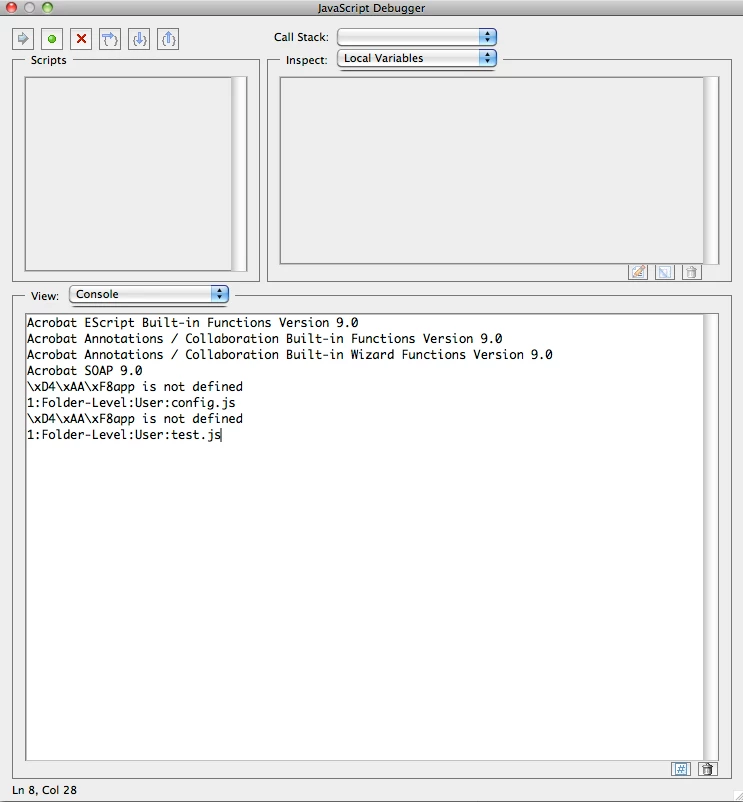
How can I clear it to make script to work for startup script??

- Sudha K

This topic has been closed for replies.
Correct answer Karl Heinz Kremer

Based on your screenshot, you are on a Mac. Here is somebody else with the same problem: Folder Level Help

Don't use ExtendScriptTK - it's not a "normal" text editor. TextWrangler should be OK, but don't paste your code from ESTK, start from scratch.

5 replies

JR Boulay
Community Expert
Community Expert
July 17, 2017

TextWrangler died, welcome to the new BBEdit : Bare Bones Software | Upgrade to BBEdit

Acrobate du PDF, InDesigner et Photoshopographe
Karl Heinz  Kremer
Community Expert
Karl Heinz KremerCommunity ExpertCorrect answer
Community Expert
July 17, 2017

Based on your screenshot, you are on a Mac. Here is somebody else with the same problem: Folder Level Help

Don't use ExtendScriptTK - it's not a "normal" text editor. TextWrangler should be OK, but don't paste your code from ESTK, start from scratch.

Sudha_KAuthor
Inspiring
July 17, 2017

Ok thank you...

i will check and come back...

Inspiring
July 15, 2017

You need to replace " 'pathToPDF' " with the real path name and file name to open not place holder/instruction text.

Sudha_KAuthor
Inspiring
July 17, 2017

Hi,

     I have used correct path in the script.  pathToPDF is sample text.  Used correct path pls check my last reply.

     Also My first screenshot is output console screen shot for the error msgs. I can run that from console for an active document  but could not get the output for startup process to add menu in application.

Bernd Alheit
Community Expert
Community Expert
July 17, 2017

You must remove the characters before app.

What text editor do you use?

JR Boulay
Community Expert
Community Expert
July 12, 2017

Here is my custom script to do the same thing, I use it every day:

function openJSref() {

    app.openDoc("/MacBookPro//Users/jrb/hubiC/Docs/Acrobat & PDFs/AA SDKs/AcDC SDK/Acrobat_DC_SDK_Documentation/AcrobatDC_js_api_reference.pdf");  

}

//  

function openJSref2() {

    app.openDoc("/MacBookPro//Users/jrb/hubiC/Docs/Acrobat & PDFs/AA SDKs/AcDC SDK/Acrobat_DC_SDK_Documentation/AcrobatDC_js_developer_guide.pdf");  

}  

app.addMenuItem({ cName: "-", cParent: "File", cEnable: false, cExec:null});

app.addSubMenu({cName: "Utilitaires", cParent: "File"});

app.addMenuItem({cName: "JS Reference...", cParent: "Utilitaires", cExec: "openJSref()"});

app.addMenuItem({cName: "JS Guide...", cParent: "Utilitaires", cExec: "openJSref2()"});

Don't forget to edit file paths.

Acrobate du PDF, InDesigner et Photoshopographe
Bernd Alheit
Community Expert
Community Expert
July 12, 2017

You must remove this part: \xD4\xAA\xF8

Did you create the js file with a text editor?

Sudha_KAuthor
Inspiring
July 14, 2017

Hi,

     Sorry for delayed response.  I have created js file using extended toolkit.

Bernd Alheit
Community Expert
Community Expert
July 14, 2017

Did you remove the characters \xD4\xAA\xF8 ?