

form field auto color/data change based on input on different page
Hello!
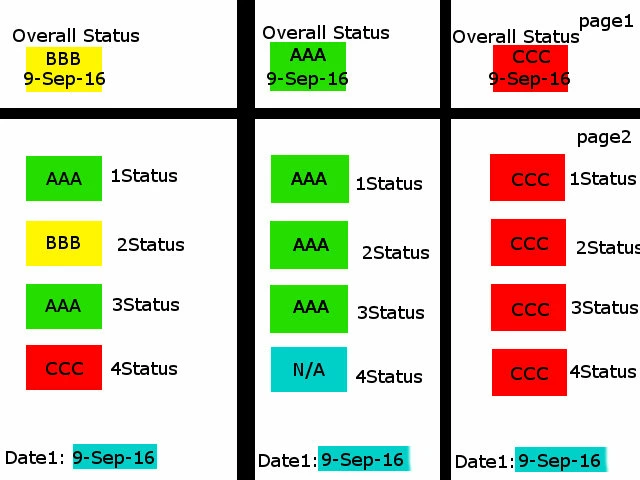
I have recently recieved help on the forums and was able to write javascript to change the form fill and border based on an individuals input(thank you!). I am now encountering issues as I continue working on this document. I drew a picture that illustrates 3 different outcomes, its located above. To explain what i need, heres how the form is supposed to work:
1. a user inputs the status of pieces of equipment on page 2, I need to ensure that only AAA, BBB, CCC, or N/A are acceptable inputs. Each value changes the form field as illustrated above and N/A makes no change to the field at all.
2. Based on the user inputs on page 2, I am trying to get a read only form field on page one "Overall Status" to change color, and change its value based on those inputs.
The three columns above illustrate 3 potential outcomes of the overall status on page 1, ie:
1: AAA [return key] date from Date1 field on page 2. (all user entries were AAA (N/A which is not factored in))
2: BBB [return key] date from Date1 field on page 2. (the user's entry contained one or more of BBB or CCC values)
3: CCC [return key] date from Date1 field on page 2. (all user entries were CCC)
I am making this form at work, and do not have adobe Adobe Acrobat XI ver: 11.0.13 at home. Thanks for the help and if my description or picture is confusing let me know and I can try to explain it differently. Each column is a potential document, the document itself does not have 3 columns.
J
 AdChoices