


edd97886174
Participant
May 28, 2018
Answered

Form Scripting Questions (multiple)

  • May 28, 2018
  • 1 reply
  • 1274 views

I would appreciate any assistance regarding several questions I have about scripting for a particular form.  I am NOT a coder (so please type slowly!).  I am currently using Acrobat Pro 11.0.23 on Windows 10.

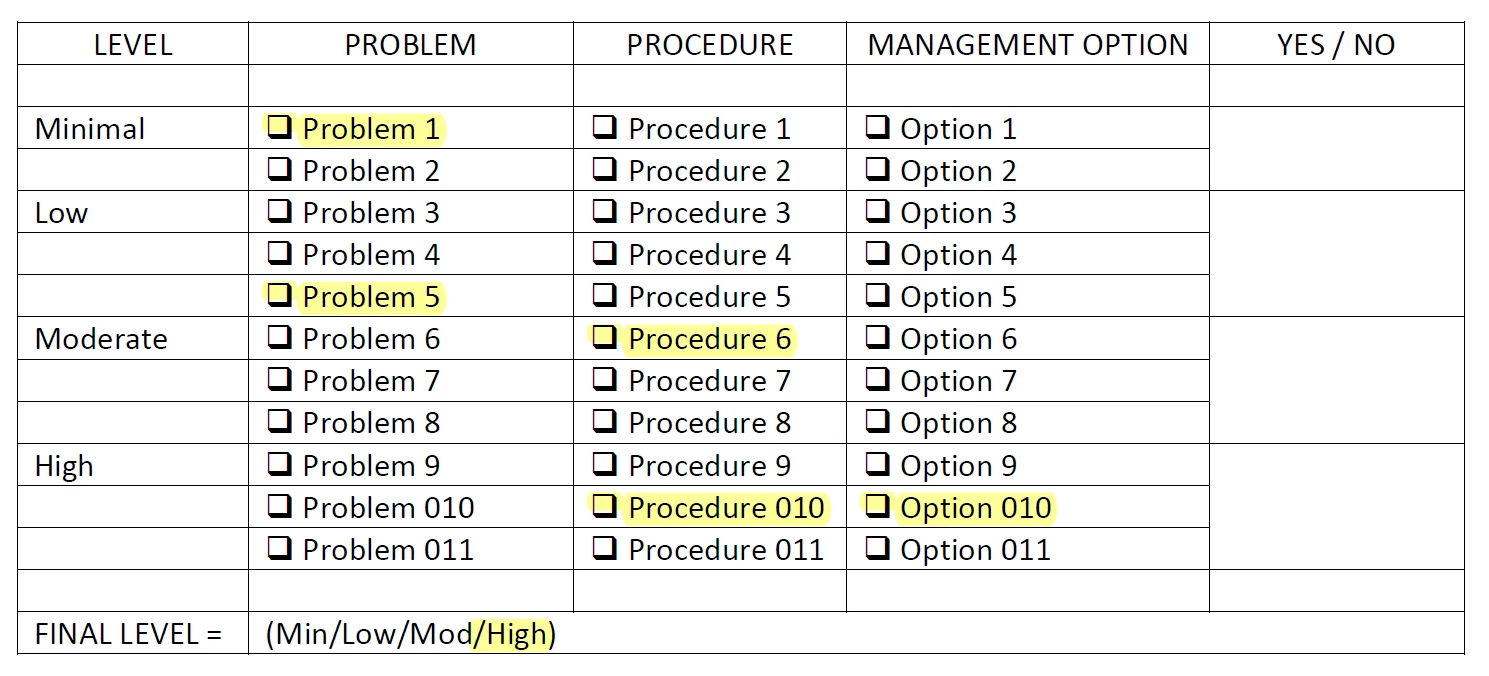
Below is a screen shot of the planned form:
INFORMATION ABOUT THE FORM:

  1. Need to be able to check off all that apply – for example a typical response might be POSITIVE
         for:  Problem 1; Problem 5; Procedure 6; Procedure 10 and Option 10.
         (All of these POSITIVE). 
  2. For Calculation of the “FINAL  LEVEL” – this relies ONLY on the single HIGHEST Problem – or Procedure –
         or Management Option.
  3. In the case above – the Final Level would be HIGH because both Procedure 10 AND Option 10 were POSITIVE.
  4. The YES / NO field could be used to indicate that ANY of the responses at that particular level had
         been selected.  (This is not completely necessary – but would make it easier to see at a glance where
         the highest level had been met.)
  5. In another case where responses showed POSITIVE for Problem 6, Procedure 1, and Option 1 – the FINAL
         LEVEL would be calculated as MODERATE – because the Problem 6 was POSITIVE.
  6. QUESTIONS:
    1. What type of “check box”  or “text box” should precede the Problems, Procedures, and Options?
    2. How to script for a binary answer for YES / NO – either ANY of the fields in that level have
            been selected – or NONE of the fields in that level have been selected –
            i.e. 1=YES; 0=NO
    3. How to script the “FINAL LEVEL” box to choose the HIGHEST LEVEL that had a POSITIVE (YES)
            response. 
    4. Again – it does not matter whether 1 or ALL of the fields at a particular level are selected –
            ANY fields return a POSITIVE for that level.  (It would merely be “helpful” to see
            what had been chosen as POSITIVE at each level.)

THANK YOU to anyone who could give me some help/advice on this.

This topic has been closed for replies.
Correct answer try67

It seems fine... Are you seeing any error messages in the JS Console (Ctrl+J)? Are there no results at all, or are they incorrect?

If the latter, check the field calculation order.

Also, do not edit the code in the Edit All JavaScripts window. It's a recipe for problems. Only edit it under the field or the doc-level script.

1 reply

try67
Community Expert
Community Expert
May 28, 2018

1. Use check-boxes. Make sure to name them in a consistent manner and give them proper export values. It will help later on.

2. This will require a custom-made calculation script. Should it work for each row? Each category (Minimal/Low/Moderate/High)? Something else?

3. Again, this will require a script. It can use the results from the Yes/No fields, though.

try67
Community Expert
Community Expert
May 28, 2018

Let's say you named the check-box fields "Problem1", "Problem2", "Procedure1", "Procedure2", "Option1", "Option2", etc.

You can enter this function as a doc-level script (under Tools - JavaScript - Document JavaScripts):

function checkFields(fields) {

    for (var i in fields) {

        var f = this.getField(fields);

        if (f.valueAsString!="Off") return "YES";

    }

    return "NO";

}

Then, create text fields called "Minimal Level", "Moderate Level", etc., and put the following as the custom calculation script of the Minimal one:

event.value = checkFields(["Problem1", "Problem2", "Procedure1", "Procedure2", "Option1", "Option2"]);

Repeat the same for the other levels, with the correct field names.

For the "Final Level" text field you can then use the following, again as the custom calculation script:

if (this.getField("High Level").valueAsSting=="YES") event.value = "HIGH";

else if (this.getField("Moderate Level").valueAsSting=="YES") event.value = "MODERATE";

else if (this.getField("Low Level").valueAsSting=="YES") event.value = "LOW";

else if (this.getField("Minimal Level").valueAsSting=="YES") event.value = "MINIMAL";

else event.value = "";