



Function to control page specific layers
I am running this at the document level and it is being executed by a bookmark calling the function.
function oneFourOne() {
var ocgSchematicArray = this.getOCGs(this.pageNum);
// Look through all the layers on this page
for (var i = 0; i < ocgSchematicArray.length; i++) {
// Find the layer name that matches the defined wire color
if (ocgSchematicArray.name == "141 (Lt Orange)") {
// If the layer is turned on...
if (ocgSchematicArray.state == true) {
// Turn the layer off
ocgSchematicArray.state = false;
}
// If the layer is turned off...
else if (ocgSchematicArray.state == false) {
// Turn the layer on
ocgSchematicArray.state = true;
}
}
}
}
If I have 2 different bookmarks and this layer exist on 2 different pages... can I make it so the function is only controlling the specific page the layer is on?
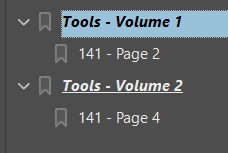
So in the picture above the 141 - Page 2 and 141 - Page 4 currently run the function oneFourOne();
I know my script is allowing it to currently turn layers on and off no matter what page. I am wanting to make it specific.
If I am on page 4 and click the 141 - Page 2 button... I don't want it to turn off the layer on that page.


 AdChoices