


Inspiring
May 25, 2018
Answered

Grouped radio buttons - auto populate another radio button based on response

  • May 25, 2018
  • 3 replies
  • 1962 views

Hi

I have searched the forums but can't find the answer to my question so I'm hoping someone on here can help.

I have a form in Adobe XI with a number of grouped radio buttons, if a user selects N/A on Section 1.1 I want all the subsequent questions in section 1.1 to auto populate the N/A radio button but if Yes or No is selected they should be able to select a radio button on the other questions.  Ideally, if N/A is selected they should also see a message telling them to go to the next question.

My form will look something like this
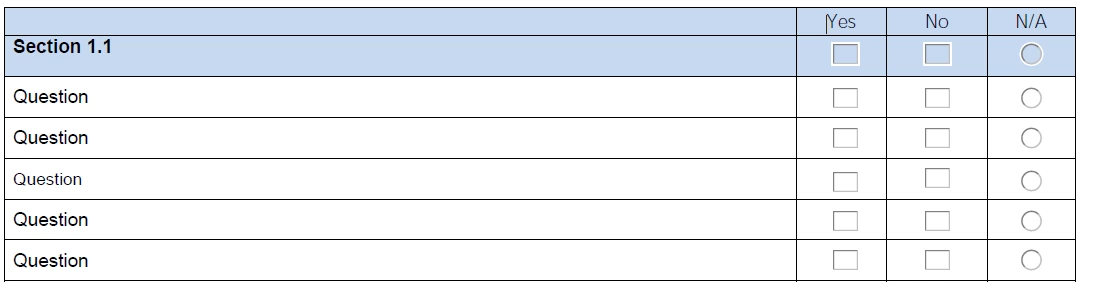
Section 1.1 - If N/A is selected all other questions in the group will all populate with N/A and a message will appear telling the user to go the next Section.  Alternatively if Yes or No is selected the user should select a response to the other questions.

Can this be done? I'd appreciate help on this one, I'm still a novice but have picked up some really useful information on this forum.

Ellen

This topic has been closed for replies.
Correct answer EllenBCC

Thank you Malcolm, I appreciate your assistance.  It's a long document so I've just taken one page out with all the code, see link below.

https://www.dropbox.com/s/2wws59itxg8stqb/Test%20Version.pdf?dl=0

Before uploading, I took the code out of the yes, no and NA fields just leaving the top level in but that's made no difference.

Ellen

3 replies

BarlaeDC
Community Expert
Community Expert
June 8, 2018

HI,

I would like to check the functionality you want to make sure I am understanding the result you need correctly.

In the form you have control questions and questions that are controlled.

CONTROL QUESTION - GENERAL PREMISE INSPECTIONS

This has the option of 'Yes' and 'N/A'.

If you select 'Yes' all questions of that section should be enabled.

If you select 'N/A' all question of that section should be disabled and controlled questions should be set to 'N/A'.

There is no 'No' Option.

CONTROLLED QUESTION - Are these inspections recorded and help on site?

This has the option of 'Yes', 'No', and 'N/A'

If you select 'Yes' nothing happens to any other field

If you select 'N/A' nothing happens

If you select 'No' nothing should happen - IS THAT CORRECT?

If the above is correct, then you need to remove the code from all the 'No' check boxes as it is not needed. The control question is the only one that requires the code to be applied.

If I have a mis-understanding, please respond with corrections and I will re-evaluate my answer.

Hope this helps

Malcolm

EllenBCCAuthor
Inspiring
June 8, 2018

You've summed that up perfectly.

I thought I'd deleted the code from the No box but obviously hadn't.  Just tested it now with the code removed and it works as it should.  Thank you for taking the time to help.  I'll go and fix the other codes now ....

Ellen

BarlaeDC
Community Expert
Community Expert
June 8, 2018

Hi,

Just a thought, do you have the code on all 'Yes' and 'No' answers of just the "GENERAL PURPOSE INSPECTIONS" question? because it only needs to be at the top level to work as you described.

If not can you upload the file so that I can take a look at the code?

Regards

Malcolm

EllenBCCAuthorCorrect answer
Inspiring
June 8, 2018

Thank you Malcolm, I appreciate your assistance.  It's a long document so I've just taken one page out with all the code, see link below.

https://www.dropbox.com/s/2wws59itxg8stqb/Test%20Version.pdf?dl=0

Before uploading, I took the code out of the yes, no and NA fields just leaving the top level in but that's made no difference.

Ellen

BarlaeDC
Community Expert
Community Expert
May 25, 2018

HI,

You could create 2 functions, probably best to add them at the document level, they would need to be something like this.

[ Code slightly more verbose than it probably needs to be for clarity ]

function disableRadioButtons ( controlButton, controlledButtons)

{

    var controlBut = this.getField ( controlButton);

    if ( controlBut.value == "Choice3")

    {

        for ( var i = 0; i < controlledButtons.length; i++)

        {

            var controlledBut = this.getField ( controlledButtons);

            controlledBut.value = "Choice3";

            controlledBut.readonly = true;

        }

    }

}

function enableRadioButtons ( controlButton, controlledButtons)

{

    var controlBut = this.getField ( controlButton);

    if ( controlBut.value != "Choice3")

    {

        for ( var i = 0; i < controlledButtons.length; i++)

        {

            var controlledBut = this.getField ( controlledButtons);

            if ( controlledBut.value == "Choice3")

            {

                // only if the NA option is selected do we unselect it.

                controlledBut.value = "";

            }

            controlledBut.readonly = false;

        }

    }

}

Then from the "Mouse Up" event if the non-NA buttons, call this

enableRadioButtons ( "Group1", ["Group2", "Group3", "Group4"]);

from the NA buttons call this.

disableRadioButtons ( "Group1", ["Group2", "Group3", "Group4"]);

Each function takes 2 parameters, the first is the NA button to control the logic, the second is an array of all the names of the groups that you want to be controlled.

Hope this helps

Malcolm

EllenBCCAuthor
Inspiring
May 29, 2018

That's brilliant, thanks for your help