



Help with loop for pages and ocg
I am trying to create a bookmark with a JavaScript function attached to it. I have done that. It is under a parent bookmark called Schematic Tools.
My problem is that the iterations of my for loop are off. I'm not sure what I am doing wrong. The layers I am looking for will ONLY exist on odd page numbers (odd being based on the page 1 is page[0] so they are on pages 2, 4, 6, 8, etc..
var onPage = 1;
var usablePages = [];
for (var z = 0; z < this.numPages; z++) {
if (onPage <= this.numPages) {
usablePages.push((onPage + 1));
onPage += 2;
}
}
// Array of all of the layers
var ocgArray = this.getOCGs();
// Create a header bookmark for all isolation tools to go under
this.bookmarkRoot.createChild("Schematic Tools");
var headerBookmark = this.bookmarkRoot.children[0];
headerBookmark.style = 3;
// Alphabetize the layers
ocgArray.sort();
for (var z = 0; z < usablePages.length; z++) {
for (i = 0; i < ocgArray.length; i++) {
if (ocgArray.name == "No Color") {
headerBookmark.createChild({
cName: ocgArray.name,
cExpr: "noColor();",
nIndex: i
});
console.println("Page #: " + usablePages
+ " Layer: " + ocgArray.name); }
if (ocgArray.name == "Black (Ground)") {
headerBookmark.createChild({
cName: ocgArray.name,
cExpr: "ground();",
nIndex: i
});
console.println("Page #: " + usablePages
+ " Layer: " + ocgArray.name); }
if (ocgArray.name == "032 (Red) (Battery Power)") {
headerBookmark.createChild({
cName: ocgArray.name,
cExpr: "zeroThreeTwo();",
nIndex: i
});
console.println("Page #: " + usablePages
+ " Layer: " + ocgArray.name); }
if (ocgArray.name == "640 (Blue) (Key Power)") {
headerBookmark.createChild({
cName: ocgArray.name,
cExpr: "sixFourZero();",
nIndex: i
});
console.println("Page #: " + usablePages
+ " Layer: " + ocgArray.name); }
if (ocgArray.name == "021 (Orange) (Starting)") {
headerBookmark.createChild({
cName: ocgArray.name,
cExpr: "zeroTwoOne();",
nIndex: i
});
console.println("Page #: " + usablePages
+ " Layer: " + ocgArray.name); }
}
}
Here is the output to the console I am getting:
Page #: 2 Layer: 021 (Orange) (Starting)
Page #: 2 Layer: 032 (Red) (Battery Power)
Page #: 2 Layer: 032 (Red) (Battery Power)
Page #: 2 Layer: 640 (Blue) (Key Power)
Page #: 2 Layer: 640 (Blue) (Key Power)
Page #: 2 Layer: Black (Ground)
Page #: 2 Layer: Black (Ground)
Page #: 2 Layer: No Color
Page #: 2 Layer: No Color
Page #: 4 Layer: 021 (Orange) (Starting)
Page #: 4 Layer: 032 (Red) (Battery Power)
Page #: 4 Layer: 032 (Red) (Battery Power)
Page #: 4 Layer: 640 (Blue) (Key Power)
Page #: 4 Layer: 640 (Blue) (Key Power)
Page #: 4 Layer: Black (Ground)
Page #: 4 Layer: Black (Ground)
Page #: 4 Layer: No Color
Page #: 4 Layer: No Color
I know for a fact that this is what the CORRECT output SHOULD be:
Page #: 2 Layer: 021 (Orange) (Starting)
Page #: 2 Layer: 032 (Red) (Battery Power)
Page #: 2 Layer: 640 (Blue) (Key Power)
Page #: 2 Layer: Black (Ground)
Page #: 2 Layer: No Color
Page #: 4 Layer: 021 (Orange) (Starting)
Page #: 4 Layer: 032 (Red) (Battery Power)
Page #: 4 Layer: 640 (Blue) (Key Power)
Page #: 4 Layer: Black (Ground)
Page #: 4 Layer: No Color
Here are the bookmarks that get created:
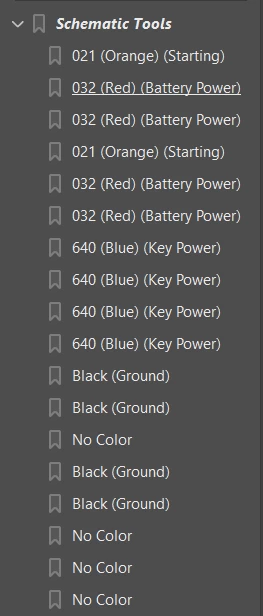
What I would love ideally is if it would break them up under two parent headers
Schematic Tools - Page 1
021 (Orange) (Starting)
032 (Red) (Battery Power)
640 (Blue) (Key Power)
Black (Ground)
No Color
Schematic Tools - Page 2
021 (Orange) (Starting)
032 (Red) (Battery Power)
640 (Blue) (Key Power)
Black (Ground)
No Color
Sorry for all the info. Any help would be greatly appreciated!



 AdChoices