
Participant
July 16, 2020
Question

Help with PDF calendar to auto form fill

  • July 16, 2020
  • 2 replies
  • 757 views

Hello,


Anyone know how to have fields auto populate based on a day selected from the PDF drop down calender. I am looking to have it where if I select Monday 7/13/2020 from the drop down it will fill 7 other fields with 7/13, 7/14, 7/15, 7/16, 7/17, 7/18, 7/19.


Ability to fill in the boxes underneath each day with the corrosponding day selected from the drop down in blue.
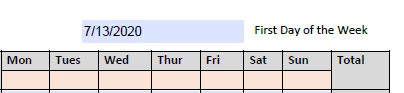
 

Any help much appreciated! Thank you.

This topic has been closed for replies.

2 replies

swapnilsrivastava
Community Manager
Community Manager
July 17, 2020
 

Hi There,


Thanks for posting the same here.

You can refer to the LINK for relevant information.


Please do let us know, if anything is required from my end.


Regards,

Swapnil Srivastava

try67
Community Expert
Community Expert
July 16, 2020

Yes, you can do it with a script. You would need to convert the value of the first field to a Date object (using util.scand) and then add days to it (using setDate and getDate) in a loop, each time writing out the result using util.printd) to the fields.

You can read more about this subject in these tutorials:

https://acrobatusers.com/tutorials/working-with-date-and-time-in-acrobat-javascript

https://acrobatusers.com/tutorials/working-with-date-and-time-in-acrobat-javascript-part-2

https://acrobatusers.com/tutorials/working-date-and-time-acrobat-javascript-part-3-3


If you're interested, I've developed a (paid-for) tool that allows you to set up such calculations very easily and quickly. You can find it here: http://try67.blogspot.com/2012/01/acrobat-apply-automatic-date.html

I can also help you out writing a validation script to make sure the first date the user enters is indeed a Monday.