


Known Participant
August 6, 2018
Answered

Help with simple conditional form

  • August 6, 2018
  • 1 reply
  • 1364 views

Hi,

I just need to create a calculation in which, in column A (Número de tarjetas a almacenar) you have a list of options to be selected. Depending on the option you select, the price is shown on column B.
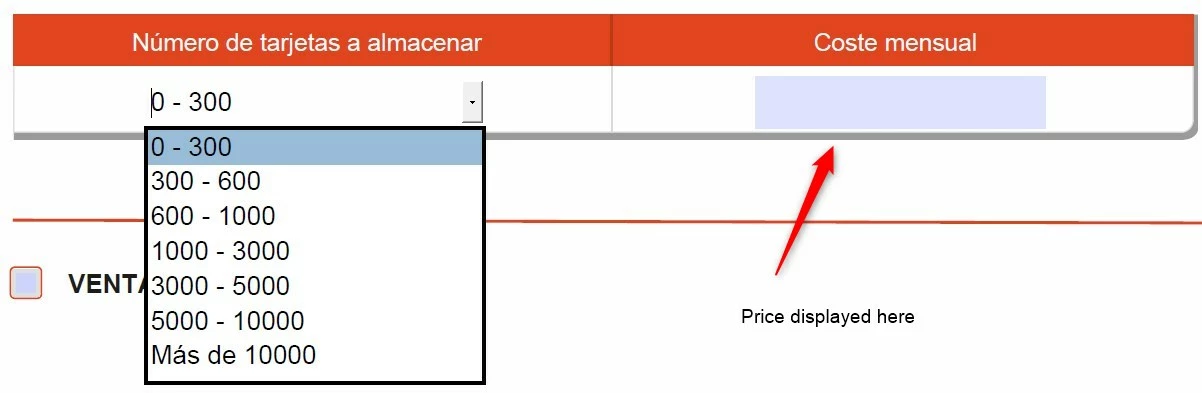
Just with this, I would be really happy :-).

An aditional question is if I can determine as an exeption that if you select the last option "Más de 10000", then the price "Coste mensual" is calculated with a formula which is a number from another box* 3

Many thanks!

This topic has been closed for replies.
Correct answer try67

OK. As the custom calculation script of the text field you can enter something like this:

var v = this.getField("Número de tarjetas a almacenar").valueAsString;

if (v=="0 - 300") event.value = "8€";

else if (v=="300 - 600") event.value = "11€";

else if (v=="600 - 1000") event.value = "15€";

// etc.

1 reply

try67
Community Expert
Community Expert
August 6, 2018

You need to provide the full details of which value should appear in the text field for each of the values selected in the drop-down.

Known Participant
August 6, 2018

0 - 300                   8€

300 - 600               11€

600 - 1000               15€

1000 - 3000               35€

3000 - 5000               60€

5000 - 10000               100€

Mas de 10.000               Precio personalizado

Thanks!

try67
Community Expert
try67Community ExpertCorrect answer
Community Expert
August 6, 2018

OK. As the custom calculation script of the text field you can enter something like this:

var v = this.getField("Número de tarjetas a almacenar").valueAsString;

if (v=="0 - 300") event.value = "8€";

else if (v=="300 - 600") event.value = "11€";

else if (v=="600 - 1000") event.value = "15€";

// etc.