


Hide entire sections of a form based on a condition
Hi I am not new but this part I am not familiar with in Adobe Acrobat Pro. I have taken over these forms from someone else in our company. I warn this is probably a loaded question, any help would be appreciated!
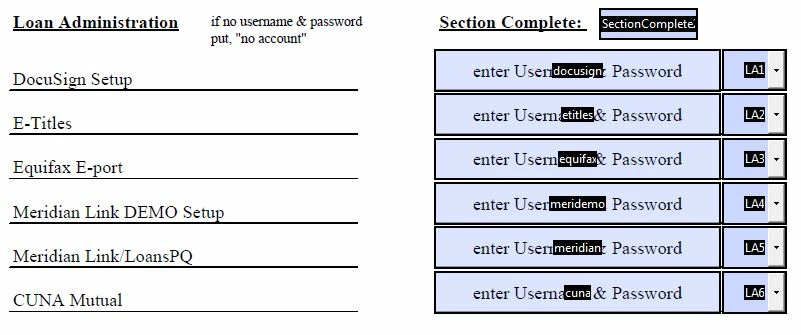
We have a form that is broken up 5 sections similar to the section below:
Some History on the current form. The Dropdown boxes (LA1, LA2, LA3, LA4, LA5, LA6) are all referenced to "SectionComplete" (which is defaulted to "NO") They must all be filled (Yes, No, N/A) for "SectionComplete" to change to "Yes". When "SectionComplete" for All 5 sections reads "Yes" there is a field near the top of the form that changes from "NO" to "YES" (default = "NO").
My question is this: I wanted to find out if it was possible to create a new Checkbox that would saying something along the lines of "Is this section Necessary", and if the box is checked, the section is hidden and the "SectionComplete" header is marked "Yes" as if all of the drop down boxes in the section had been completed (like it was overriding them, or checking the box did mark all of the dropdown boxes with a selection to force a "Yes" selection). The end result having the with the section looking like this below (plus the addition of new checkbox

In the example below: Everything on the left under that entire first line starting with Loan Administration is Permanent written text. On the Right is obviously fillable text fields, then drop down boxes. The Dropdown boxes (LA1, LA2, LA3, LA4, LA5, LA6) are all referenced to "SectionComplete". They must all be filled
 AdChoices