



How can you remove the zero from calculation field, if there is no value
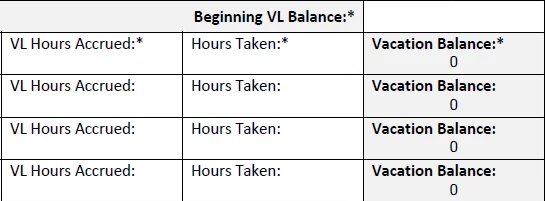
Adobe Acrobat XI Pro -- Fillable Form
Hi,
I have a successful calculation using the simplified field notation (on the calculation tab) in my field called VacationBalance2.
(VacationBalance1 + HoursAccrued2) - HoursTaken2
How can I say, if there is no value in HoursTaken2, put nothing in VacationBalance2? As in, do not show a zero.
I have tried semblances of:
IF(HoursTaken2 = "","",(VacationBalance1 + HoursAccrued2) - HoursTaken2)
I have tried it like this, putting an equal sign in front of the IF, the way I would do it in Excel:
=IF(HoursTaken2="","",(VacationBalance1 + HoursAccrued2) - HoursTaken2)
I have tried saying: If(HoursTaken2=0,"", etc.
or: If(HoursTaken2 Is "", "", etc.
In the above case, I have been able to not show the zero, but then I also do not get an answer if HoursTaken2 DOES have a value in it. See below.
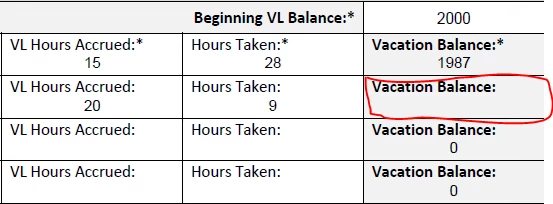
Again, my original formula works, but it shows a zero. How do I make it NOT show a zero, if there is nothing in the "Hours Taken" field? But, if there IS a value in Hours Taken, then I DO need the formula to work.
I'd appreciate any help.
Thank you. : )
 AdChoices