Participant
August 31, 2016
Answered

How do I convert PDF to Excell

  • August 31, 2016
  • 3 replies
  • 1758 views

I am very new and untrained on how to use this program.

It was purchased for the direct purpose of converting PDF to Excell.

I am unable to find any help with this subject.

Can anyone help me. Please.​

This topic has been closed for replies.
Correct answer Karl Heinz Kremer

Are you using Adobe Acrobat or the ExportPDF online service?

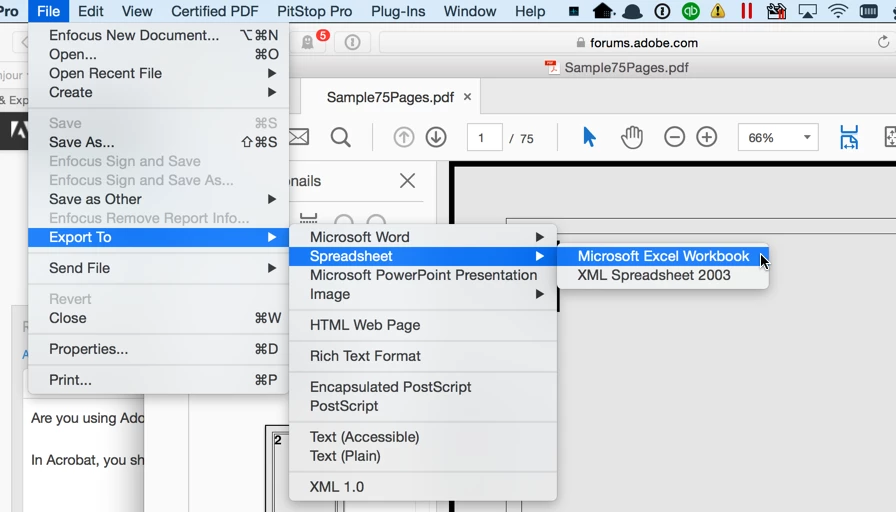
In Acrobat, you should load your PDF file and then select File>Export To>Spreadsheet>Microsoft Excel Workbook

If you are using the ExportPDF solution, go to https://cloud.acrobat.com and log in with your Adobe ID. Then select the "Export PDF" function, upload your PDF document and wait until the Excel (or Word) document is generated.

3 replies

Participant
January 31, 2017

Hello, I have adobe acrobat pro- but due to some reason I don't have export to spreadsheet option ( Have word jpg etc. Please help

Karl Heinz  Kremer
Community Expert
Community Expert
January 31, 2017

Which version of Adobe Acrobat Pro do you have?

Karl Heinz  Kremer
Community Expert
Karl Heinz KremerCommunity ExpertCorrect answer
Community Expert
August 31, 2016

Are you using Adobe Acrobat or the ExportPDF online service?

In Acrobat, you should load your PDF file and then select File>Export To>Spreadsheet>Microsoft Excel Workbook

If you are using the ExportPDF solution, go to https://cloud.acrobat.com and log in with your Adobe ID. Then select the "Export PDF" function, upload your PDF document and wait until the Excel (or Word) document is generated.

Participant
August 31, 2016

?I'm using Adobe Acrobat.

Constance L. Shehan, Ph.D.

[Mod: Personal information removed]

Participant
August 31, 2016

I have a similar but not exact problem.  I bought the product in order to convert PDF to Word.  Usually it works.  But today for some reason -- probably because I'm hitting a deadline -- the Convert button isn't appearing.

Help me, too!