


Participant
November 29, 2017
Question

How do I edit a shape color on a form?

  • November 29, 2017
  • 1 reply
  • 677 views

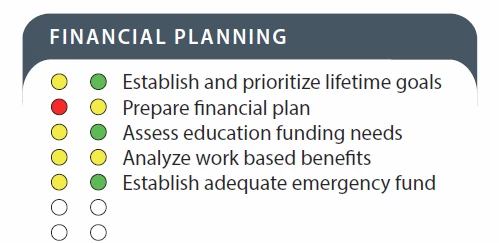
I'm trying to create a fillable form where there are two circle shapes and a line of text next to them - somewhat of a timeline checklist. I'd like my team to be able to change the color of the circles from white to either red, yellow or green - preferably via a drop down. If drop down isn't available, that's fine, but I need another solution BESIDES making color-filled comment shapes. These are checklists that we'll be customizing many times a week so we need to make it as user-friendly as possible.

This is a closeup of the template that needs to be a form with editable colors:

And this is what it should look like once edited, as a deliverable:
This topic has been closed for replies.

1 reply

Inspiring
November 29, 2017

This is possible using form fields, but it's not a built-in behavior, so you have to fake it using JavaScript. Here are links to some demos that illustrate aspects of this approach:

http://acroscript.net/pdf/demos/multistate_4.pdf

http://acroscript.net/pdf/demos/button_checkbox.pdf

So the idea is to set up each circle as a button and use JavaScript to cycle through the various colors you want to use when each is clicked, so you're faking a multistate check box.

For the lines, it might make sense to leave them off or use a script to remove the underline once a field is filled in. A custom validation script for such a text field might be:

// Custom validation script for a text field

event.target.strokeColor = event.value ? color.transparent : color.black;

This assumes the border style is set to underline.

Participant
December 1, 2017

Hi George,

Thanks for getting back to me. I opened the links you shared and clicked around a bit, but I have no idea how to make a button (or it what program it's supposed to be made in), and I definitely do not know how to write JavaScript. Do you know if there's something out there that will write the JavaScript for me? Or do you know if there's a certain formula I need to follow to write my own? I'm totally green to all of this. I've been searching for other videos and tutorials to try to help me but maybe I'm searching the wrong thing? Any suggestions on wording so I can get the right search results to come up?