Uniquah
Participant
July 20, 2016
Answered

How do I turn off the "Highlie Fields" option in DC on iMac?

  • July 20, 2016
  • 1 reply
  • 839 views

I just switched over from PC and there was a button on the menu bar. Easy breezy. This is driving me crazy.

This topic has been closed for replies.
Correct answer Karl Heinz Kremer

This function was moved to Acrobat's preferences, and has an unfortunate, and not intuitive name:
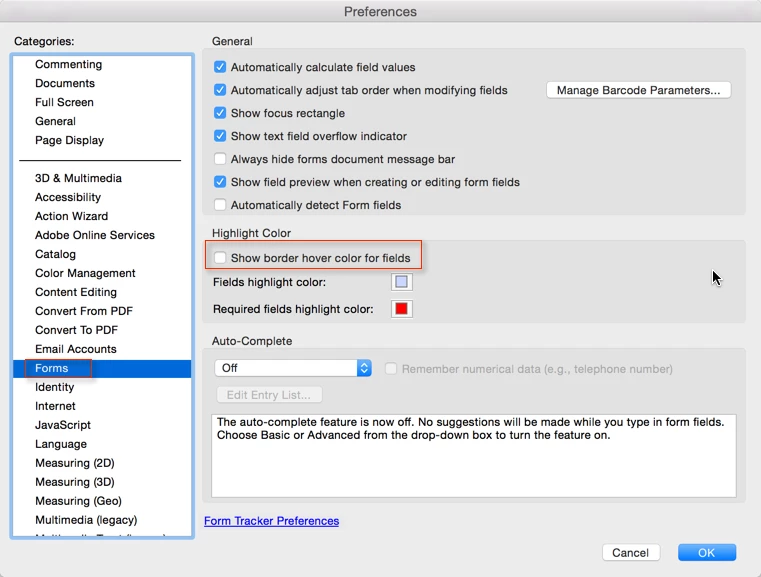
When you turn that checkbox off, you will see your field background color again.

1 reply

Meenakshi Negi
Legend
July 22, 2016

Hi Uniquah

Could you please let us know what exactly you are trying to do and the button you are talking about.

Please also share the dot version of Adobe application and OS you are using.

Regards,

Meenakshi

Uniquah
UniquahAuthor
Participant
July 22, 2016

I'm using Acrobat Pro DC for Mac.

2015.016.20045

Architecture: x86_64

Build: 15.16.20045.188096

AGM: 4.30.64

CoolType: 5.14.5

JP2K: 1.2.2.36256

The highlight fields option is on whenever I view a pdf and I can't turn it off. All the fields are showing the bluish highlight colour instead of the chosen fill colours.

On the PC version, Acrobat 9, there was always a "Highlite Fields" button on the top right corner. It's not there now with DC on Mac. It doesn't seem to be anywhere. I do't know if this is Mac thing or a DC thing but it's driving me crazy.

Thanks Meenakshi.

Karl Heinz  Kremer
Community Expert
Karl Heinz KremerCommunity ExpertCorrect answer
Community Expert
July 22, 2016

This function was moved to Acrobat's preferences, and has an unfortunate, and not intuitive name:

When you turn that checkbox off, you will see your field background color again.