


Inspiring
May 24, 2017
Answered

How to change the font of a specific variable?

  • May 24, 2017
  • 6 replies
  • 4534 views

Rich text formatting is selected.

this is a javascript question.

This is a calculated field for a form field.

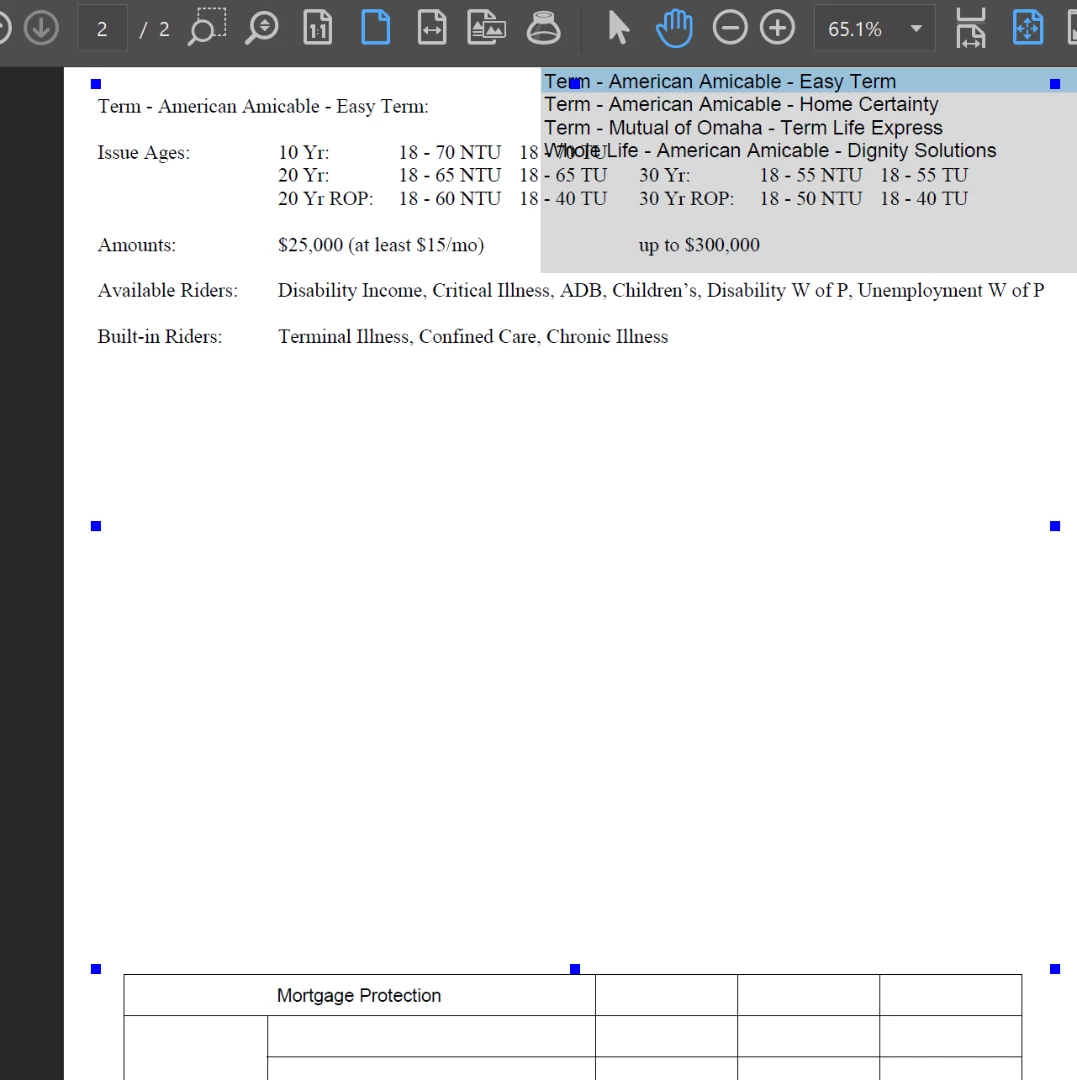
I just want 1 variable, no array needed. I would like my variable to be bold, centered, and larger font.

What I currently have... which do nothing...

var val = getField("Products").value;

val.alignment = "center";

val.fontStyle = font.TimesB
This topic has been closed for replies.
Correct answer nathanm54209085


No thank you. I'll try a different forum.

6 replies

Legend
May 25, 2017

Nothing in the code you posted resembles the problem you describe (setting format). It does something I don't understand with descriptions instead.  I think I too need to bow out. Good luck with finding a forum where you are more in tune with the people there, we're obviously not communicating in a way that's useful to you or productive for us. In my (not comprehensive) experience, you will find that most programming forums put a much higher demand on clarity and communication than non-programming forums, and have less patience.

Inspiring
May 25, 2017

There's enough description in all of my replies. I can't force anyone to read them

Joel Geraci
Community Expert
Community Expert
May 25, 2017

No. I'm sorry but there just isn't enough information to give you a solution but only to point you in the right direction. Please consider that you might not know enough about Acrobat JavaScript to accurately determine if your responses are, in fact, helpful.

Unless I can get a copy of the file to examine it for myself, I'm out.

Legend
May 25, 2017

Please post the specific code you are now trying to use. Without the .value where I said. It's generally impossible to know what code someone is now using by the time you factor in inexperience, typos and wild frustration. Yes, wild frustration, I've been programming for decades and that is a continuing normal experience that never goes away.

Inspiring
May 25, 2017

(function () {

    // Initialize some variables

    var i, aLines = [];

    // Associate states with a description

    var oDescriptions = {

"Term" : "\nIssue Ages:\t\t10 Y",

"Term - Am" : "This",

"Term - " : "\nIssue Ag",

"Whole Life - Amer" : "This is a whole life"

    }

    // Get the selections from the list box

    var val = getField("Products").;

    if (typeof val === "object") {

        for (i = 0; i < val.length; i += 1) {

            aLines.push(val + ":\n\t " + oDescriptions[val] + "\n====================================================================================");

        }

    } else {

        aLines.push(val + ":\n\t " + oDescriptions[val]);

  }

    // Set this field value

    event.value = aLines.join("\r");

})();

Joel Geraci
Community Expert
Community Expert
May 25, 2017

I'll need to see the actual form before supplying any more help.

Legend
May 25, 2017

Ok. The last bit of code had  ".value" on the first line. Take it off, it does not belong.

Commentary: You have made an error by putting it there and refusing to remove it despite repeated attempts to send you in the right direction. Look at the description of the Field class, and its properties. Don't assume that "value" means any more than exactly what it says, don't try to use what you know about English to extrapolate.

Inspiring
May 25, 2017

I've tried it without or with it. Still no font or alignment change.

Commentary: if you highlight my text,  press Ctrl + c, then Ctrl +v into the reply field.  You can make the exact changes I've been requesting, then click post. I will get my solution that I've been begging for, and you'll get a well deserved thank you. And then this forum will be vindicated as a forum, not a tutoring session.

Legend
May 25, 2017

A hint: you need to work with the field properties, not the value properties. So you have a  .value  that is quite wrong.

Inspiring
May 25, 2017

Can I please get the answer... I don't care about hints,  vague ideas,  homework assignments,  suggestions to Google, or repeating what I've already said.

I just want it to work

Joel Geraci
Community Expert
Community Expert
May 25, 2017

You don't actually need Rich Text to be checked if you aren't going to have multiple styles in the field. The problem you are having is that you are trying to set field properties on the field value rather than the field object itself. You were also using the wrong property name for the font.

See corrected code below.

var val = this.getField("Products");

val.alignment = "center";

val.textFont = font.TimesB

Inspiring
May 25, 2017

Thanks for the correction... nothing happened. The entire field is still left aligned and not bold

Joel Geraci
Community Expert
Community Expert
May 25, 2017

Where exactly are you putting the code?

Bernd Alheit
Community Expert
Community Expert
May 24, 2017

You must use span objects. Read the documentation in the Acrobat JavaScript Reference.

Inspiring
May 24, 2017

WIth all due respect, I have read it, that's why I'm here. Its vague instructions aren't solving my problem.

I want the variable val to be bold, center, and larger. Part of the code is:

var val = getField("Products").value;

if (typeof val === "object") {

        for (i = 0; i < val.length; i += 1) {

            aLines.push(val + ":\n\t " + oDescriptions[val]);

        }

    } else {

        aLines.push(val + ":\n\t " + oDescriptions[val]);

  }

     // Set this field value

    event.value = aLines.join("\r");

})();

Bernd Alheit
Community Expert
Community Expert
May 24, 2017

Why didn't you change the properties of the field?