

Impressive_Coral6C13
Participant
May 17, 2018
Question

How to create Javascript for time sheet

  • May 17, 2018
  • 2 replies
  • 1776 views

Good evening,

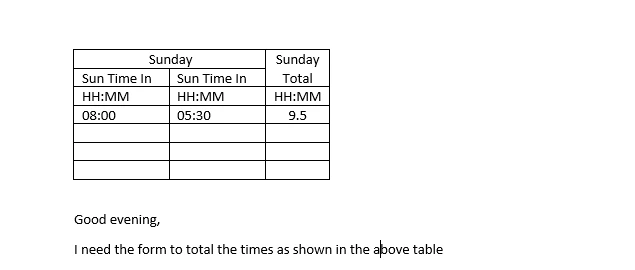
I need help with the below table. Is there a simple script to total the time in an adobe acrobat form?

Thank you in advance for your help.
This topic has been closed for replies.

2 replies

Inspiring
May 17, 2018

Got excatly the time sheets at work.

I named my fields that way ->  ADM034.TABLE.number.number

numbers are replaced by the y/x position of the cell as if it was a table in excel.  The first number being the row (y) and the last number being the column (x).  Numbers are 0-based.

ADM034.TABLE.0.0     ADM034.TABLE.0.1     ADM034.TABLE.0.2

ADM034.TABLE.1.0     ADM034.TABLE.1.1     ADM034.TABLE.1.2

ADM034.TABLE.2.0     ADM034.TABLE.2.1     ADM034.TABLE.2.2

etc

Then put the same script in the calculate event of the total field.  (You should pass it as a doc level function but you don't have to)

var myName = event.target.name

var aName = myName.split(".")

var myLine = Number(aName[2])

var myColumn = Number(aName[3])

//gather the values

var SstartValue = this.getField("ADM034.TABLE."+myLine+"."+(myColumn-2)).valueAsString

var SstartTime = SstartValue.substr(0, 2)+":"+SstartValue.substr(2)

var SendValue = this.getField("ADM034.TABLE."+myLine+"."+(myColumn-1)).valueAsString

var SendTime = SendValue.substr(0, 2)+":"+SendValue.substr(2)

if ((SstartValue != "")&&(SendValue != "")){

//convert to date object

var OstartTime = util.scand("yyyy-mm-dd HH:mm", "2018-01-01 "+SstartTime)

var OendTime = util.scand("yyyy-mm-dd HH:mm", "2018-01-01 "+SendTime)

//convert to milliseconds

var milStart = OstartTime.valueOf()

var milEnd = OendTime.valueOf()

//End time update

if (milStart > milEnd) milEnd += 1000*60*60*24

event.value = (milEnd-milStart)/(1000*60*60)

}

else event.value = ""
