

How to create search button for interactive PDF without popup search pane
I am creating an interactive PDF using Acrobat DC.
The PDF needs to include a "search" button that users can click on, that has the same function of typing Ctrl + F (to bring up the search function in Adobe Reader).
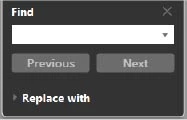
This search window should appear:
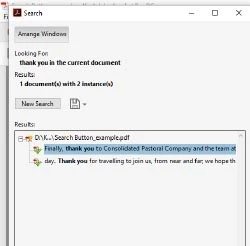
I've tried using the below javascripts, but when I click on the buttons, a pane listing search results pops up.
See below:
JAVASCRIPT 1:
var textToSearch = this.getField("Search").valueAsString;
if (textToSearch!="") search.query(textToSearch, "ActiveDoc");
JAVASCRIPT 2:
var textToSearch = app.response("Enter the search term:");
if (textToSearch!="") search.query(textToSearch, "ActiveDoc");
Is there any way of creating a button that only brings up the search window (top image) but not the panel of search results?
Many thanks!


 AdChoices