


Participating Frequently
April 30, 2018
Question

How to delete a page containing specific words?

  • April 30, 2018
  • 4 replies
  • 838 views

Hello

I'm new to scripting and new in ADOBE DC,

so far I have understood how to run a code through the console.

I have found thanks to By Karl Heinz Kremer this code :

for (var p=this.numPages-1; p>=0; p--) {

    for (var n=0; n<this.getPageNumWords(p); n++) {

       var theCurrentWord = this.getPageNthWord(p, n);

       if (theCurrentWord == "9 - 10 ANS") {

             this.deletePages(p);

             break;

       }

       else if (theCurrentWord == "MOIS") {

             this.deletePages(p);

             break;

       }

    }

}

it works very well, but it takes a very long time to run. and I have 7 to 10 more words to loop in the circuit... so it will take longer...

Is there any way (code !) to point out where to look for, because my information is always written at the same place (see here below). This would save time, wouldn't it?
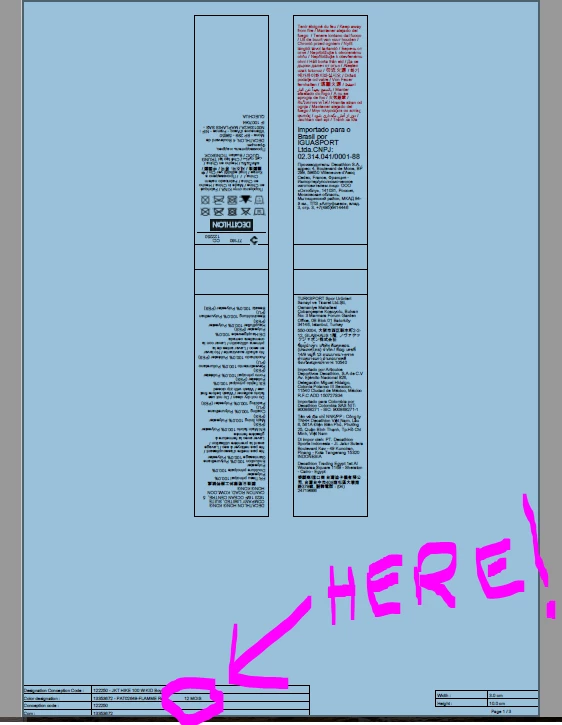
If anyone can help, I would really appreciate: I have around a 100 files to clean up like that and one file takes 1hour and 40 min if I delete it manually .

thanks

Stef

This topic has been closed for replies.

4 replies

Inspiring
May 1, 2018

First crop each page to the area of interest, then do your search. When done, uncrop each page. You should also make sure it's not possible to attempt to delete all pages, since you must have at least one.

Inspiring
May 1, 2018

You can crop pages using the doc.setPageBoxes JavaScript method.

Participating Frequently
May 1, 2018

Hello George_Johnson

thank you for this idea. I'll try it out.

Stef

Legend
April 30, 2018

That looks OK. For general efficiency I'd move this.getPageNumWords(p) before the inner loop and put it in a variable. To speed up efficiency for this use case, I'd be inclined to check if theCurrentWord ends in the string " ANS", because you will quickly eliminate most mismatches.

Page deletion is expensive, if you often delete blocks of consecutive pages it might be worth combining them. Complicated code though.

Participating Frequently
April 30, 2018

it is very nice of you to help me.

this is my very first contact with Coding and I am not sure to be able to apply you suggestions.

is it that what you mean?

for (var n=0; n<this.getPageNumWords(p); n++ {

    for (var p=this.numPages-1; p>=0; p--) {

      var theCurrentWord = this.getPageNthWord(p, n);

      if (theCurrentWord == "9 - 10 ANS") {

            this.deletePages(p);

            break;

      }

      else if (theCurrentWord == "MOIS") {

            this.deletePages(p);

            break;

      }

    }

}

Stef

pixxxelschubser
Community Expert
Community Expert
April 30, 2018

Hi StefNegoce​,

I'm not an Acrobat scripter.

But IMHO better ways exists. Like the following example. The snippet checks if any of the requested strings are included. The alert shows you the result.

// define some strings

var arr = [["7 ANS",], ["8 ANS",], ["9 ANS",], ["10 ANS",], ["12 ANS",], ["14 ANS",], ["16 ANS",], ["18 ANS",], ["20 ANS",], ["3 ANS",], ["15 ANS",], ["101 ANS",], ["10 anS",] ];

// this regex should find the 7,8,9,10,12,14,16,20 ANS and not find 3,15,101 ANS and also not 10 anS

var reg = /\b[12]?[0246-9]\sANS\b/;

for (i=0; i<arr.length; i++) {

    arr[1] = " | This Regex will find = " + reg.test(arr[0]);

}

var arr2 = arr.join("\r"); alert (arr2);

Try the snippet. (It works standalone.)

Bernd Alheit
Community Expert
Community Expert
April 30, 2018

Info: you will never find a word like "9 - 10 ANS".

Participating Frequently
April 30, 2018

sorry , but I did run a Script with this ''9 - 10 ANS''  ''Word'' and it did remove my pages !!

Legend
April 30, 2018

No, it would take longer. You can get the location of every word along with the text of every word, but checking the position of every word will take longer than looking at the text of each one. This is about as efficient as it can be done in JavaScript.

Participating Frequently
April 30, 2018

many thanks for your answer.

If this is not possible, do you advise me to loop all the information at once creating a scipt looking like that:

for (var p=this.numPages-1; p>=0; p--) {

    for (var n=0; n<this.getPageNumWords(p); n++) {

       var theCurrentWord = this.getPageNthWord(p, n);

       if (theCurrentWord == "10 ANS") {

             this.deletePages(p);

             break;

       }

       else if (theCurrentWord == "12 ANS") {

             this.deletePages(p);

             break;

       }

       else if (theCurrentWord == "9 ANS") {

             this.deletePages(p);

             break;

       }

       else if (theCurrentWord == "8 ANS") {

             this.deletePages(p);

             break;

       }

       else if (theCurrentWord == "7 ANS") {

             this.deletePages(p);

             break;

       }

       else if (theCurrentWord == "14 ANS") {

             this.deletePages(p);

             break;

       }

       else if (theCurrentWord == "16 ANS") {

             this.deletePages(p);

             break;

       }

       else if (theCurrentWord == "18 ANS") {

             this.deletePages(p);

             break;

       }

       else if (theCurrentWord == "20 ANS") {

             this.deletePages(p);

             break;

       }

    }

}

or do you advise me to run them 2 by 2 or 3 by 3?

For information, so far, I have managed only to run it once with only 2 ''RESEARCHED WORDS'' as in my first script.

waiting for your advises!

Good day to you

Stef