


Impressive_Coral6C13
Participant
February 26, 2018
Question

How to determine the highest number, second highest and third?

  • February 26, 2018
  • 3 replies
  • 587 views

Good morning,

I have a form that I need the following:
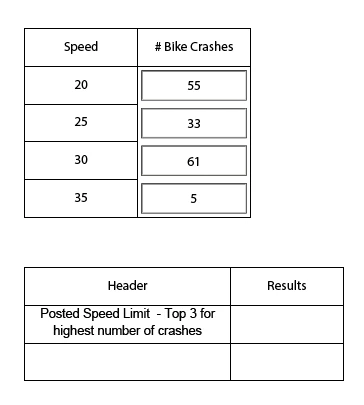
The user will enter the number of bike crashes per speed

I would like the "Results" field to look at the "# Bike Crashes" and list the top three speeds in this format:

Speed 20, 55 bikes crashes, Speed 30, 61 bike crashes and Speed 25, 33 bike crashes.


What script can be used to perform this task?

Thank you in advance for your help.

This topic has been closed for replies.

3 replies

try67
Community Expert
Community Expert
February 26, 2018

I would use this code as the custom calculation script of the field that should show the largest three values:

var fields = ["Crash20", "Crash25", "Crash30", "Crash35"];

var values = [];

for (var i in fields) {

    var v = this.getField(fields).valueAsString;

    if (v) values.push(Number(v));

}

values.sort(function(a,b){return Number(a) - Number(b);});

event.value = values.slice(0,3).join(", ");

Impressive_Coral6C13
Participant
February 26, 2018

Thank you fir you r response.

Can you be more descriptive? I put the following in the "Results" fieldvar aRslts = this.getField("Crash20").getArray().sort(function(a,b){return b.value > a.value;}).slice(0,3);

Named the speed accordingly: Crash20, Crash25, Crash30, Crash35.

Thom Parker
Community Expert
Community Expert
February 26, 2018

The script relies on the "Dot" notation. so the group name "Crash" must the separated from the speed number by a "."

This script was intended to be used in the calculation script for the Result field. However, you can test it in the Console window if you want to see how it works.

The Acrobat JavaScript Console Window - YouTube

Thom Parker - Software Developer at PDFScriptingUse the Acrobat JavaScript Reference early and often
Thom Parker
Community Expert
Community Expert
February 26, 2018

A simple way to do this is to group the "# of crashes fields" using dot notation. For example "Crash.20", "Crash.25", etc. with this method you can extract and sort the results in a single line of code.

var aRslts = this.getField("Crash").getArray().sort(function(a,b){return b.value > a.value;}).slice(0,3);

This code returns an array of the 3 fields with the largest values. where the first field in the array has the largest value.

Formatting for output is just another step.

event.value = aRslts.map(function(a){return "Speed " + a.name.replace(/Crash\./,"") + ", " + a.value + " bike crashes";}).join("\n");

Note that this returns a multiline string, so the result field must be 3 lines in height.

Thom Parker - Software Developer at PDFScriptingUse the Acrobat JavaScript Reference early and often