This topic has been closed for replies.
Correct answer Test Screen Name

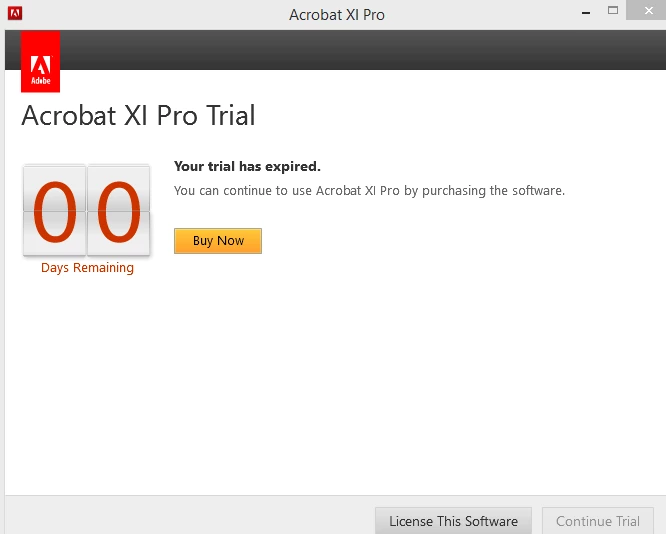
They aren't pop ups. They are telling you that your trial has expired. You cannot continue, you have to solve the problem.

Some possible solutions.

1. You had a trial of Acrobat Pro and decided not to buy it. In this case you must uninstall it and go back to using the free Reader, which you might need to reinstall.

2. You have an active subscription. If so, Try signing in to the creative cloud app. If you're already signed in, sign out and sign in.

3. You purchased Acrobat Pro DC. If so, install it, you can't run the old XI instead.

4. You have an old purchase of Acrobat Pro XI and it stopped working, going to s trial instead. Thus can happen if you replace a disk and God other reasons. If do let us know, there are things to try, or contact Adobe.

5 replies

Legend
November 7, 2018

Sign in. Adobe (who know best) have decide everyone must be always signed in. If it doesn't remember, there is a separate issue.

kellyp57369961
Participant
November 7, 2018

I have Adobe Acrobat Pro DC, and it is working great! All except for the pop-up I get when I open a pdf file and start Acrobat. I get a popup asking me to sign in to access my membership information. This is terribly inconvenient and inefficient. How do I stop these?

Legend
August 3, 2017

What is this "regular Adobe"? I would guess Acrobat Reader but it doesn't have a trial. What is "Adobe Pro"? Is that Actobat Pro? Please give exact versions Of both.

loisstiles
Participant
August 3, 2017

I have Adobe Pro working.  We had a blue screen last week and in the reinstall someone installed a trial for a regular Adobe.  How do I remove this without causing problems on my Adobe Pro?  Pop-up are happening all the time and I keep telling it not to continue the trial.  How can I remove and will this cause problems for my Adobe Pro.  Thanks.

loisstiles
Participant
August 3, 2017

Are you there?

Test Screen NameCorrect answer
Legend
July 30, 2016

They aren't pop ups. They are telling you that your trial has expired. You cannot continue, you have to solve the problem.

Some possible solutions.

1. You had a trial of Acrobat Pro and decided not to buy it. In this case you must uninstall it and go back to using the free Reader, which you might need to reinstall.

2. You have an active subscription. If so, Try signing in to the creative cloud app. If you're already signed in, sign out and sign in.

3. You purchased Acrobat Pro DC. If so, install it, you can't run the old XI instead.

4. You have an old purchase of Acrobat Pro XI and it stopped working, going to s trial instead. Thus can happen if you replace a disk and God other reasons. If do let us know, there are things to try, or contact Adobe.