


November 16, 2017
Question

how to hide dropdown default item

  • November 16, 2017
  • 1 reply
  • 525 views

iam new in adobe component field.
i have a drop down, with 4 item. where 1 item was a default item.
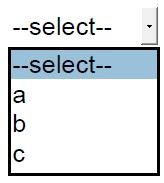
i set "--select--" as default item.
what i want is when i click on the drop down. item `--select--` was hidden or not show.

but then i click on my custom button where it is a reset form. the drop down value back to pointing at `--select--`

thanks

This topic has been closed for replies.

1 reply

Inspiring
December 25, 2017

If you are the developer of the form, then you can just use a space instead of the "--select--" string if you want to control the displayed value. If you want to hide the "--select--" text when printing, you can add some custom JavaScript to the "Will print" action to hide the field and then add some JavaScript to the "Did print" action to display the field.