


Participating Frequently
July 22, 2018
Question

How to I do to let the specific field be hidden?

  • July 22, 2018
  • 2 replies
  • 558 views

1) Initially, Field A and Field B are visible for person to input.
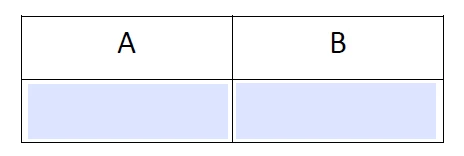
2) During input some words in Field A (eg. Peter)
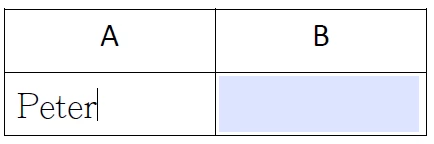
3) After input words, Field B is hidden. Person cannot input anything in Field B.
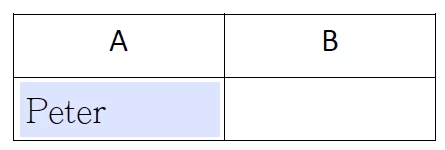
4) If I delete the words in field A (Become blank), Field B becomes visible again.

I don't know how to make the java-script code for this activity. Would you mind help me design? Thank You.

This topic has been closed for replies.

2 replies

leafchanAuthor
Participating Frequently
July 22, 2018

Thank you for your reply. It save me a lot of time.

BarlaeDC
Community Expert
Community Expert
July 22, 2018

Hi,

Add this code to the validation event of Field A

if ( event.value !== "")

{

     // replacing to use recommended method

     // [DEPRICATED} this.getField("Field B").hidden = true;

     this.getField"Field B").display = display.hidden;

}

else

{

     // replacing to use recommended method

     // [DEPRICATED] this.getField("Field B").hidden = false;

      this.getField"Field B").display = display.visible;

}

Make sure the text inside the quotes matches the name of Field B.

Hope this helps

Malcolm

{edit: as per comment below, to make sure anyone finding in the future gets the correct code )

try67
Community Expert
Community Expert
July 22, 2018

It is not recommended to use the hidden property, since it has been deprecated.

You should use the display property instead, like this:

this.getField("Field B").display = display.hidden;

Or:

this.getField("Field B").display = display.visible;