matthewt75233907
Participant
January 10, 2018
Answered

How to input different Values based on radio button selection

  • January 10, 2018
  • 1 reply
  • 989 views

I have a document with 2 different options to choose from. Upfront payment, or monthly repayment.

I need to know what Javascript to write: If option 1 is selected, then value is "Total Cost", but if Option 2 is selected, then value is "Total Cost / 36"

Thanks

This topic has been closed for replies.
Correct answer Thom Parker

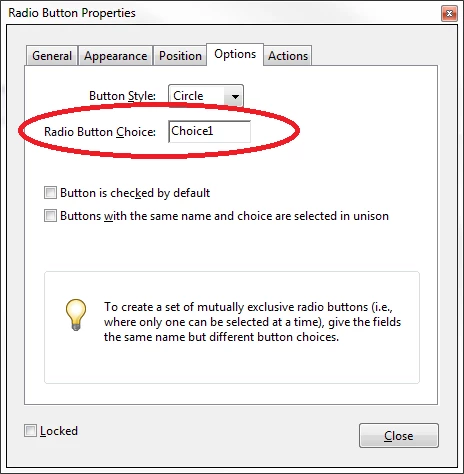
Make sure the choice values of the radio buttons are set to Choice1 and Choice2.  You'll find the Radio button Choice value on the Options tab of the radio button properties dialog, the

Add this code to the Calculation script for the field that will display the value.

event.value = this.getField("Total Cost").value;

if(this.getField("RadioButton").value == "Choice2")

    event.value = event.value/36;

1 reply

Thom Parker
Community Expert
Thom ParkerCommunity ExpertCorrect answer
Community Expert
January 10, 2018

Make sure the choice values of the radio buttons are set to Choice1 and Choice2.  You'll find the Radio button Choice value on the Options tab of the radio button properties dialog, the

Add this code to the Calculation script for the field that will display the value.

event.value = this.getField("Total Cost").value;

if(this.getField("RadioButton").value == "Choice2")

    event.value = event.value/36;

Thom Parker - Software Developer at PDFScriptingUse the Acrobat JavaScript Reference early and often
matthewt75233907
Participant
January 10, 2018

Thank you!