


Question
How to make an 'Action' delete the original file (after reducing its size) and to output logs?
My organisation keeps thousands of PDFs (mostly scanned forms, documents etc.), many of which have ridiculously large file sizes due to incorrect scan settings. I'm looking for a way to automate the task of reducing the file sizes while indicating that the file's size was reduced in case something goes wrong.
Hence, I'm trying to set up a custom Action in Acrobat Pro XI to:
- Reduce PDF file sizes in a directory
- Can be done very easily: Reduce PDF file size on several pdf automatically ()
- Delete the original PDFs
- Acrobat allows you to overwrite the original PDFs (by keeping the original file name), however, I need to insert some text in the filename in order to indicate that it was reduced
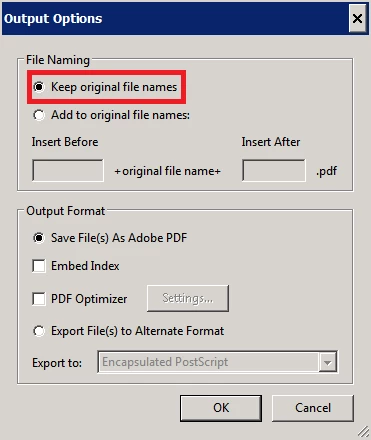
- If text is inserted into the file name, both the original and the reduced files are retained in the directory
3. Output logs for what was done
- Whether or not the file size was successfully reduced
- Whether the file was skipped (for whatever reason)
- Whether the original file was deleted
- Date and time of when the Action started on the PDF (not essential)
- Amount of time it took for the Action to execute on the PDF (not essential)
Is there way to accomplish tasks 2 and 3 via Javascript within the Action? This will be running on a Windows Server 2008 R2 machine if it makes any difference. Any help would be much appreciated.
 AdChoices