
Participant
January 28, 2016
Answered

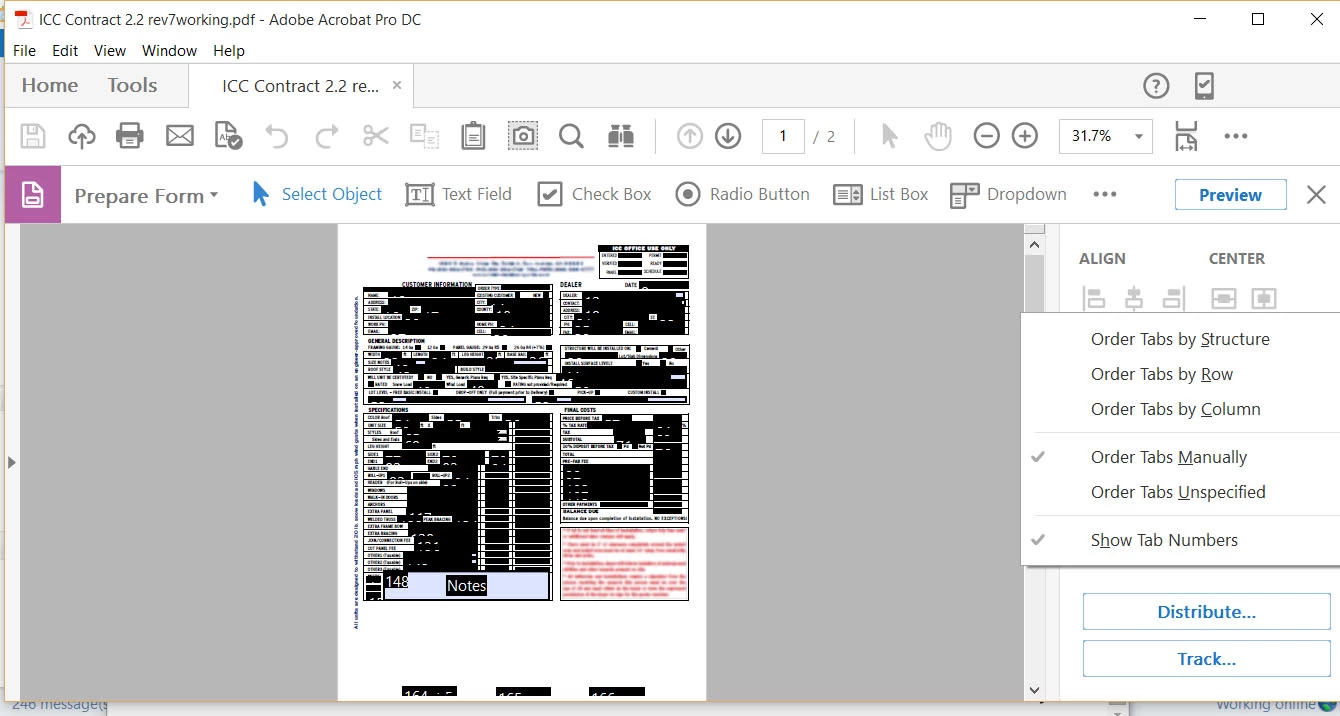
How to open the "Field Pane" in Acrobat Pro DC?

  • January 28, 2016
  • 2 replies
  • 935 views

In this form, I want to order the fields so that the users can move from field to field in order by using TAB key. I can´t find where to order the fields. I can´t find the "Field Pane". How do I find it?
This topic has been closed for replies.
Correct answer Bernd Alheit

Increase the height of the application window.

2 replies

Participant
November 12, 2020

I know this post is old. I'm hoping you'll still get this message. I have this same issue on my remote laptop, but not on my workstation desktop. I'm unable to change "the display setting" "from a remote session ". Is there something an Admin could do to correct the issue? Any ideas are appreciated.

Bernd Alheit
Community Expert
Bernd AlheitCommunity ExpertCorrect answer
Community Expert
January 28, 2016

Increase the height of the application window.

RoSMRAuthor
Participant
January 28, 2016

Thank you. Could you be a little more specific? I can´t find anything that I can increase the height.


This question has come up several times in this forum and it has never been resolved so I am sure your answer will be extremely helpful to people.

Bernd Alheit
Community Expert
Community Expert
January 28, 2016

This are basics of Microsoft Windows:

Working with windows - Windows Help