


Maximilion_Ma
Known Participant
April 26, 2018
Question

How to put data into a fillable PDF form and export it?

  • April 26, 2018
  • 7 replies
  • 4403 views

Hi all,

I've asked a similar question before: How to use external data to fill in an existing PDF form in JavaScript?

Also, I learned these two links as references:

Batch-Import Excel Data into PDF Forms - KHKonsulting LLC

Batch-Import List Data into PDF Form - KHKonsulting LLC

But I still have some questions because I don't have JavaScript experience before, still a beginner now. Any help and suggestions are appreciated.

What I would like to do is put the "username" and "age" to a fillable pdf form. I've already written some JS script.

==========================================================

var userInfo = {                                               // data source
   userOne: {

   name : "Max M",
   age : "100"},
   userTwo: {

   name: 'Louise H',
   age: '200'
   }

}

function getUserInfo(id, key) {                    // get data
   return userInfo[id][key];
}

class User {                                               // create a class to store data
   constructor (id) {

   this.userData = {};
   var requiredList = ['name', 'age'];           // can be added
   requiredList.forEach((key)=>{

   this.userData[key] = getUserInfo(id, key);
   });
   }

}

function getAllInfo(id) {                                // return the data
   var user = new User(id);
   return user.userData;
}

=======================================================

The PDF form is like:
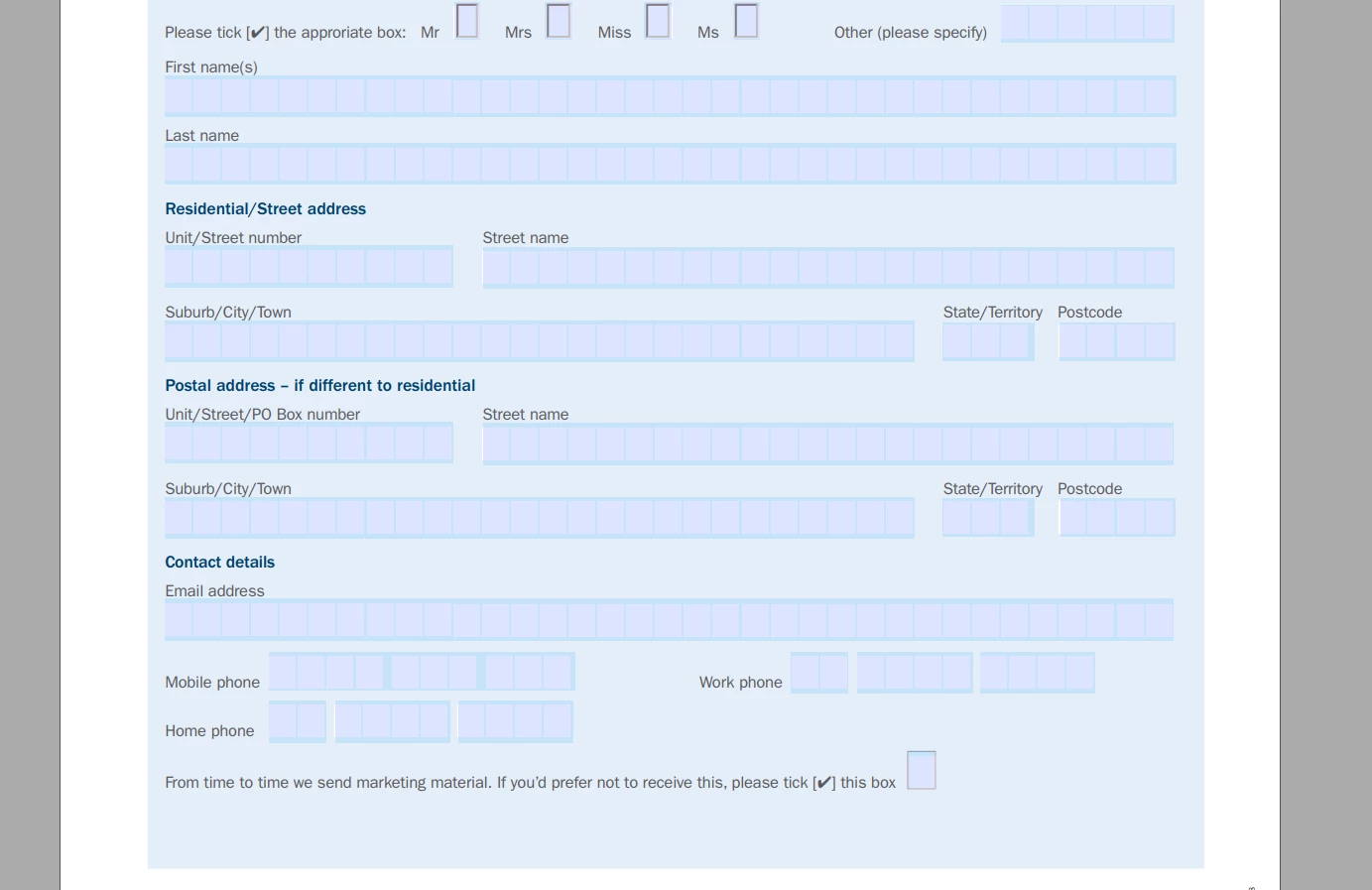
What I don't know are :

1. how to import a pdf in this code

2. export this pdf after filling that data above

Thank you so much for any help!

Changjian

This topic has been closed for replies.

7 replies

Joel Geraci
Community Expert
Community Expert
April 26, 2018

Ok - Let's start over. First, forget about using the code you already have. While it is JavaScript, it isn't JavaScript that is written for Acrobat or Reader. Please describe exactly what you want to do. Be specific. Where is the PDF? Where is the data? How do you expect the PDF to communicate to where the data exists? Is this something you run yourself or will your users (known or unknown) filling the PDF or causing it to be filled?

Maximilion_Ma
Known Participant
April 27, 2018

Hi Joel_Geraci,

Thank you for your reply.

What I need to do is to write a piece of code to populate an existed PDF form with data. No matter on a server or not. It can be done on a local desktop if I use Acrobat API. The PDF form and the data are both already hone in my desktop. I need to put the data into PDF form programmatically. So I am trying to implement it by using Acrobat API. Sometimes I got confused because I am still a beginner level of coding. I will continue learning it.

Changjian

Joel Geraci
Community Expert
Community Expert
April 27, 2018

Ok - What format is the data in? Can it be put into Excel? If so, your task is fairly simple.

Legend
April 26, 2018

"Just a small function" means "just use Acrobat a little bit". Since you can't legally use it AT ALL that's a non starter. And JavaScript is a way (for this purpose) of controlling Acrobat. So you need to look at the bigger picture. Server solutions and desktop solutions almost always involve entirely different software, so it's always the first question to ask.

Maximilion_Ma
Known Participant
April 27, 2018

Hi Test Screen Name,

Thank you for your reply. You really gave me lots of hints and methods of what I need to do. After confirming with my supervisor,  my task is to write a piece of code to populate an existed PDF form with data. No matter on a server or not. It can be done on a local desktop or on a web page. So I decided to implement this via acrobat API(local process). Thank you for helping me.

Changjian

Legend
April 26, 2018

It really matters where your data is, because Acrobat is not licensed for server use. You need to understand whether your project can be done legally! To understand the difference between "on server" and "not on server", let's try and understand what exactly you mean by "download". Is there a web site? What actions do you see that make the "download".

Maximilion_Ma
Known Participant
April 26, 2018

Yes, there is a web page(HTML)  actually, the function I need to implement is: when a user clicks the button on that web page, some data(fake) can be auto-filled in a fillable pdf form and display on the screen, I mean, if the form can be displayed , it can also be downloaded, right?  It is just a small function.

try67
Community Expert
Community Expert
April 26, 2018

That's not the issue. The issue is that you can't use Acrobat as a server application, neither technically (it wasn't built for it) nor legally (the EULA forbids it).

What you're describing can be achieved using either a server-side script or a stand-alone application. I've created solutions that take input from an HTML page to a PHP script, which in turn calls a Java application to populate a PDF form with data, and return it to the user.

It's probably possible to do it without the Java part, too. Another option is to generate an FDF file and load it into the PDF, but that won't always work (it depends on the viewer used in the browser).

Legend
April 26, 2018

Please answer because it is very important,  both technically and legally. You want this filling to happen on a server (so it can be downloaded)? Or not?

Maximilion_Ma
Known Participant
April 26, 2018

Actually I don't know what's the difference between on a server or not on server. My requirement is only fill in the pdf form and can be downloaded. I just assume that I already get the data, it doesn't matter where the data is. It is like a prototype, just a function or a script.

My university supervisor told me to implement this prototype function. That's it. I really don't know more about it. 

Legend
April 26, 2018

So, you do want something for a server (if you want it to be ready to download)?

Maximilion_Ma
Known Participant
April 26, 2018

Yes, I want that pdf can be downloaded after filling in the data.

try67
Community Expert
Community Expert
April 26, 2018

You can't use the "class" keyword in Acrobat JS. It's from a version (ECMAScript 4) that's not supported by it.

Maximilion_Ma
Known Participant
April 26, 2018

Thank you for your advice. May I ask which keyword can replace it? Thank you!

try67
Community Expert
Community Expert
April 26, 2018

It's not just a question of replacing one keyword with another. You need to write your code in a different way.

I would say you can use a function, but it must return an object. Also, I'm not too sure about the "constructor" command...

Bernd Alheit
Community Expert
Community Expert
April 26, 2018

You must use JavaScript, not Java.

Maximilion_Ma
Known Participant
April 26, 2018

Yes, I know. The language I used is JavaScript. But I don't know how to fill pdf form and export it.

Legend
April 26, 2018

What do you mean by "import a PDF". You already have a PDF, just have it open.