


May 11, 2017
Answered

I am having an issue with a Javascript

  • May 11, 2017
  • 2 replies
  • 520 views

I am new to Java Scripts. I read several online articles and have had some success but the one I am trying to attempt is not working.  I am on Adobe XI Pro.

What I am trying is a simple algebra calculation  E = A-(B+C+D).     I didn't use the Simplified Calculations because my fields were named with Symbols and Spaces automatically when I created the document.  I was having a problem with the calculation order here anyway.

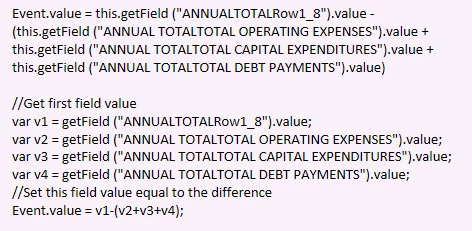
I have attempted this in two different formats - please see below but neither give ma a calculation.  I am not getting any errors they just don't work.

Can someone please point me in the right direction?
This topic has been closed for replies.
Correct answer try67

Something very important to remember is that JS is case-sensitive.

So replace "Event" with "event" and it should work...

2 replies

JR Boulay
Community Expert
Community Expert
May 11, 2017

Hi.

JavaScript is case sensitive, so you should use "event.value" instead of "Event.value".

You should activate the JavaScript Console too.

Acrobate du PDF, InDesigner et Photoshopographe
try67
Community Expert
try67Community ExpertCorrect answer
Community Expert
May 11, 2017

Something very important to remember is that JS is case-sensitive.

So replace "Event" with "event" and it should work...

JR Boulay
Community Expert
Community Expert
May 11, 2017

We are well synchronized!

Acrobate du PDF, InDesigner et Photoshopographe
try67
Community Expert
Community Expert
May 11, 2017

So it seems... :-)
