


Inspiring
August 8, 2016
Answered

I cant uninstall acrobat dc

  • August 8, 2016
  • 2 replies
  • 827 views

I have been having problems updating Acrobat dc. I was told I should uninstall and reinstall. When I try to uninstall Acrobat from Creative Cloud it stalls out at 2% and then trys to update (which fails). I then tried to uninstall it through Acrobat Uninstaller. Under Acrobat Uninstaller it begins to remove the files then prompts me for a user name and password, accepts them and then cancels the uninstall. This is the error is gives me.
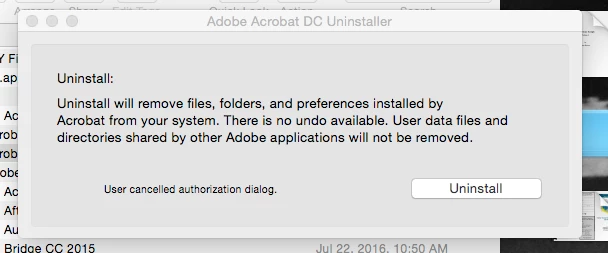
Does any one know whats going. Acrobat seems to be super buggy on Mac. It's getting really frustrating

[Asking in the correct forum helps... Moved from non-technical Forum Lounge to specific Program forum... Mod]

This topic has been closed for replies.
Correct answer kglad

your mac will prompt you for your mac password, but not a user name and the adobe uninstaller won't prompt for either so it's not clear what prompt you're seeing.

you could attach a screenshot of that prompt.

2 replies

JmcginnAuthor
Inspiring
September 15, 2016

Well it looks like something was corrupt with my operating system. I was able to update to El Capitian and then was able to remove and then reinstall Acrobat. Go figure.

kglad
Community Expert
kgladCommunity ExpertCorrect answer
Community Expert
August 8, 2016

your mac will prompt you for your mac password, but not a user name and the adobe uninstaller won't prompt for either so it's not clear what prompt you're seeing.

you could attach a screenshot of that prompt.