Participant
April 14, 2016
Answered

I have Acrobat 9 Pro. I cannot change the opacity setting for text created by the typewriter tool. It fades all text out after typing. Help!!!

  • April 14, 2016
  • 2 replies
  • 2314 views

I have Acrobat 9 Pro. I cannot change the opacity setting for text created by the typewriter tool. It fades all text out after typing. Help!!!

This topic has been closed for replies.
Correct answer George_Johnson

It is included in the Windows registry, which you can edit with the registry editor. Before you do anything that I suggest below, you should become familiar with the Windows registry and the problems that can occur when editing it. You will find this discussed many places on the net, for example: What is Registry Editor? - Windows Help

You can launch the registry editor by doing the following in Windows:

Start > Run > type "regedit" > OK > Yes (when prompted to allow changes)

You should see a left and right hand panel and you'll want to navigate to the registry entry as shown below:
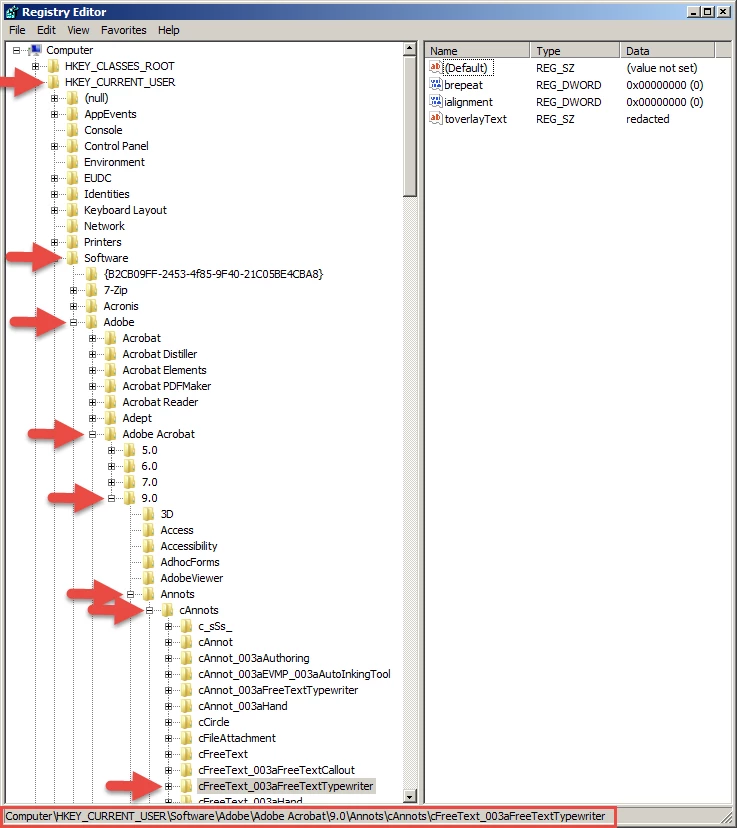
If there is an entry for "dopacity" in the panel on the right in the Name column, you should see that it has a value (Data column) less than 1. You can either change it to 1, or remove the dopacity key altogether.


2 replies

Inspiring
April 15, 2016

See this old thread for something you can try: Typewriter Tool's Text color is no longer black

Participant
April 15, 2016

Thanks. I saw this yesterday, but didn’t know where or how to look for this “file”(?)

HKEY_CURRENT_USER\Software\Adobe\Adobe Acrobat\7.0\Annots\cAnnots\cFreeText_003aFreeTextTypewriter

Geoff

George_JohnsonCorrect answer
Inspiring
April 16, 2016

It is included in the Windows registry, which you can edit with the registry editor. Before you do anything that I suggest below, you should become familiar with the Windows registry and the problems that can occur when editing it. You will find this discussed many places on the net, for example: What is Registry Editor? - Windows Help

You can launch the registry editor by doing the following in Windows:

Start > Run > type "regedit" > OK > Yes (when prompted to allow changes)

You should see a left and right hand panel and you'll want to navigate to the registry entry as shown below:

If there is an entry for "dopacity" in the panel on the right in the Name column, you should see that it has a value (Data column) less than 1. You can either change it to 1, or remove the dopacity key altogether.

April 15, 2016

Hi ,

Acrobat 9 is an older and unsupported version .

I hope this is not due to an an incompatible OS.

Regards

Sukrit Dhingra

Participant
April 15, 2016

I have Windows 7 on my computer, and it used to work just fine, but in the last few months this “fade out” started.

Geoff