
Known Participant
February 2, 2024
Question

I need to click on a number to populate text in a text box in a different spot on my document.

  • February 2, 2024
  • 1 reply
  • 899 views

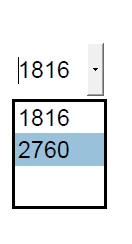
I need to be able to click on one of these numbers; each number will populate a different text into the text box below. I have read many of the Q & A's here are some are close to what I need, but do not work for my specific issue. 

Any help will be greatly appreciated! 
 

This topic has been closed for replies.

1 reply

Thom Parker
Community Expert
Community Expert
February 2, 2024

What you mean to ask is,  "I want to populate a text box from a selection in a dropdown field".  


Add this code to the custom Validation script for the dropdown.


this.getField("Text11").value = event.value;


Thom Parker - Software Developer at PDFScriptingUse the Acrobat JavaScript Reference early and often
Known Participant
February 5, 2024

Thank-you for your answer, it did work. 🙂 

However, here is a snippit of a simpler example of what I am trying to do: 

I want to make a checkbox like this - 

That will populate text and the check on a seperate page to look like this: 

So one checkmark needs to populate a checkmark and text. 

Does this make sense? 


Thom Parker
Community Expert
Community Expert
February 5, 2024

You can read about the basics of programming checkboxes and radio buttons here:

https://www.pdfscripting.com/public/Checkboxes-and-Radio-Buttons.cfm


With a checkbox, use the MouseUp action.


if(event.target.value != "Off")

{// Set text and check

    this.getField("TextBox").value = "some text";

    this.getField("OtherCheck").value = "Yes";

}

else

{// Clear Text and check

    this.getField("TextBox").value = "";

    this.getField("OtherCheck").value = "No";

}


Be aware that to set a checkbox, the checkbox value must be set to it's Export Value.


Thom Parker - Software Developer at PDFScriptingUse the Acrobat JavaScript Reference early and often
