
Participant
May 26, 2016
Question

I Use adobe acrobat DC for viewing and digitally signing my PDF's I worked fine for me previously, from few days Iam getting a error saying : "error encountered while signing"

  • May 26, 2016
  • 1 reply
  • 945 views

I Use adobe acrobat DC for viewing and digitally signing my PDF's I worked fine for me previously, from few days Iam getting a error saying : "error encountered while signing"

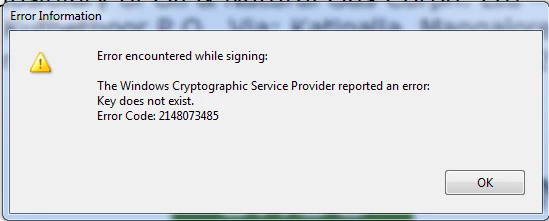
The error propt is as follows:

Error Encountered while signing:

The windows Cryptographic Service Provider reported an error:

Key does not exist.

Error Code: 2148073485
This topic has been closed for replies.

1 reply

Adobe Employee
June 1, 2016

Hi Roshan:

We published a KB article related to this issue just a while back.

Windows cryptographic service provider error | Key does not exist, error code 2148073485

While we investigate it further, the workaround provided in the article should help.

"Check with your signature device or driver manufacturer for an updated driver that may resolve this error.

If the requested hashing algorithm is not supported by the signature device, then the solution is to set registry key aSignHash to SHA1 as described on this page -http://www.adobe.com/devnet-docs/acrobatetk/tools/PrefRef/Windows/Security.html#Signing:Ha shAlgorithm. However, this is not a recommended approach as this would set SHA1 as the default hashing algorithm for all signatures, which is considered deprecated industry wide. Therefore, Adobe strongly recommends checking with your signature device or driver manufacturer to get a newer device or driver that supports SHA256 or higher hashes."

Participant
June 10, 2016

I am not a computer.. I don't know how to set registry values .. so please guide me.