
Participant
April 2, 2019
Answered

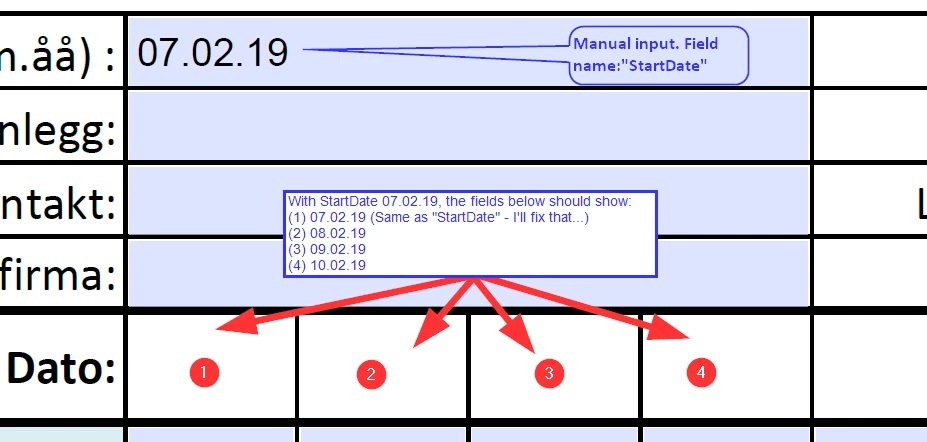
Incremental dates in fields based on a manual date input in a "StartDate" field

  • April 2, 2019
  • 1 reply
  • 1664 views

I have this form with a start date that need to be manually input by the users. Based on that date, the fields 1 to 4 should be filled automagically with the "StartDate"+0,  "StartDate"+1, "StartDate"+2, "StartDate"+3, (...). How do I solve that with a Java script in Acrobat?

I'm thankfull for any help here!
/Getve

This topic has been closed for replies.
Correct answer try67

Use this code as the custom calculation script of your fields:

var startDateString = this.getField("StartDate").valueAsString;

if (startDateString=="") event.value = "";

else {

    var startDate = util.scand("dd.mm.yy", startDateString);

    startDate.setDate(startDate.getDate()+0); // change 0 to 1, 2, 3, etc. for the other fields

    event.value = util.printd("dd.mm.yy", startDateString)

}

If you're interested, I've also developed a (paid-for) tool that allows you to set up such calculations very easily: Custom-made Adobe Scripts: Acrobat -- Apply Automatic Date Calculation

1 reply

try67
Community Expert
try67Community ExpertCorrect answer
Community Expert
April 2, 2019

Use this code as the custom calculation script of your fields:

var startDateString = this.getField("StartDate").valueAsString;

if (startDateString=="") event.value = "";

else {

    var startDate = util.scand("dd.mm.yy", startDateString);

    startDate.setDate(startDate.getDate()+0); // change 0 to 1, 2, 3, etc. for the other fields

    event.value = util.printd("dd.mm.yy", startDateString)

}

If you're interested, I've also developed a (paid-for) tool that allows you to set up such calculations very easily: Custom-made Adobe Scripts: Acrobat -- Apply Automatic Date Calculation

GetveAuthor
Participant
April 3, 2019

Hi try67 & thanks!

Your code solved my challenge after a small adjustment. I changed startDate to startDateString in line 04 and 05 (as below) and voila; it worked!

var startDateString = this.getField("StartDate").valueAsString;

if (startDateString=="") event.value = "";

else {

    var startDateString = util.scand("dd.mm.yy", startDateString);

    startDateString.setDate(startDate.getDate()+0); // change 0 to 1, 2, 3, etc. for the other fields

    event.value = util.printd("dd.mm.yy", startDateString)

}

I'll certainly check out your tool if this scrifpting thing is getting a habbit... Again, thank you very much - brilliant!